Some of us have multiple gmail login Ids for whatever reasons, but we can not open all the ids at a time using gtalk client on a single computer. If you singin to gmail with one ID you have to logout before you could login to other gmail ID. One solution for this is to use gtalk, gmail in IE and gmail in Firefox simultaneously, this way you can signin to different Gmail accounts. The other solution is to use meebo.
But there is a small tweak with which you could login to several Gmail ids using google talk client. The tweak is a command line code, this will allow you to open multiple instances of gtalk on a single computer. So far i have logged in with 4 different Gmail Ids at a time and they are working perfectly.
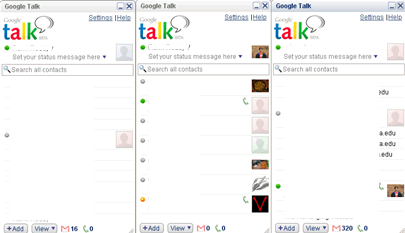
Image showing 3 gtalk instances logged in at a time
How to open multiple gtalk
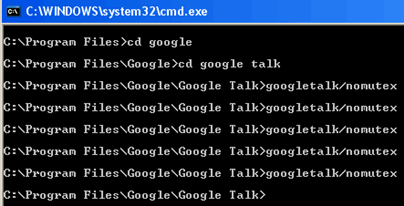
Click start button and hit run, type command in the run window, now go to the directory where google talk is installed, here enter googletalk/nomutex, now you will see gtalk will open, enter the same command to open multiple instances of gtalk. That’s it now you have multiple gtalk instances running simultaneously with different IDs logged in.
Start –>Run–>command
C:\Program Files\Google\Google Talk>googletalk/nomutex


You have some other unrealized use of have nomutex option.
is cpu overloaded from this situation ?
@Benedict I dont know abt other uses
@tech I opened 5 at a time, but it looks ok
im unable to open gmail as well as gtalk
Gmail problem is not becoz of the multiple instances of gtalk. Lot of people have this problem when using Firefox 2.0.0.7, to avoid this uninstall Adblock extension and restart firefox, if it doesn’t help clear all cache and restart firefox agian. This will surely works.
thanks its working
in cmd
but windows not working
thanks a lot
give mw new internet tricks
this is great thank u very much…
I want to open gtalk from the start->run , so what is the key word for that.
ex:- when we open notepad directly from the Run. just like that.
thx 4 tat bro it works
jst
try like this who dont no how to use command
cd progra~1
same 4 other command & it works
SORRY NOT HAPPENING IN GTALK 1.8 BETA. IT’S GIVING ERROR CAN’T FIND SPECIFIED PATH…. 🙁
Hey why to do all these.
1.Create a shortcut in desktop.
right click and type this “C:\Program Files\Google\Google Talk\googletalk.exe” /nomutex”. 2. thats it.
thanks a lot.