 I have been playing with a Firefox extension called ThumbStrips, this is a quite nice tool it makes screenshots of the sites you visit.
ThumbStrips makes a filmstrip of thumbnails of the web pages you visit, so that you can go back to them and see what you browsed. In other words this extension makes thumbnails for your history pages, you can exclude sites for which you don’t want to store thumbnails.
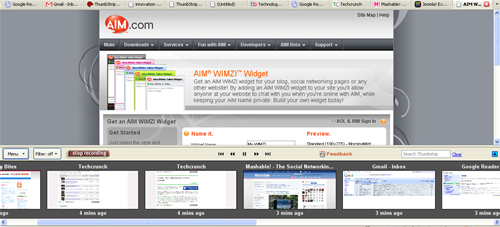
Once you install the extension it starts taking thumbshots of the pages you visit, a small icon will appear on the Navigation toolbar, you can click on that to see a slideshow of thumbstrips created. The thumbstrips appear as a frame in the bottom of the browser window, you can click on any thumbstrip to visit that web page.The created thumbnails can be saved and shared with friends.
Thumbstrips is a product of Innovation Lab. You can download the ThumbStrips extension from Mozilla site


how exactly useful is this? seems annoying to and to my bandwidth as snap preview
@Sindhu
Thanks for commenting
It is just for the thumbnail view of your history nothing more nothing less. It doesn’t annoy you like snap preview, you can hide it easily. I dont know about the bandwidth, i have unlimited plan 🙂
I’m somewhat in agreement with Sindhu on this one. I really don’t see a point behind getting continually getting screenshots of webpages, unless you’re trying to track a bad employee or something, but that’s when you’ve got a history section.
I’d prefer to get them when I wanted, using an extension like Scrapbook.
Pretty fun. But, not suitable for bandwidth limited user. I have try it of course, and I’m satisfy the new look on my FX. but… It’s a little annoying to some other things is moving when I’m scrolling the page…
And it has some bugs that make my firefox couldn’t smoothly typing comments like typing in your comment box. The letter show up slower than before.
I’m currently using firefox 2.0.0.3. 🙂
It looks good. Although I probably wouldn’t use it since it doesn’t seem to be all that useful.