WordPress is a great platform for blogging, i thinks majority of the bloggers use wordpress. WordPress is not only for blogs it can be used as a CMS for small businesses or for news portals. WordPress ease of use, nice list of features and a simple and powerful administration is ideal for anybody to use it as their publishing platform.
I am developing a news portal using wordpress, i thought i will share with you what and how i am doing it, this may help some of you probably. When i started working on it i realised that there are not so many resources available in this direction and another problem is that its hard to find themes for these type of sites.
First and foremost thing is to design a front page layout, i am not so good at PHP so i completely relied on Google and WordPress Codex. Here i will tell you step by step how to get a news site design using wordpress multiple loops function.
We don’t want our home page to look like a typical blog with posts arranged chronologically, i want to show one featured article, and 3 other articles on the home page top section arranged in 2 columns.
Below is the code used for this layout (look here for the text file with this code).
Featured article (Please change the CSS classes in the code)
<?php $posts = get_posts( "category=1&numberposts=1" ); ?><?php if( $posts ) : ?>
<?php foreach( $posts as $post ) : setup_postdata( $post ); ?>
<h2<<a href="<?php the_permalink() ?>" rel="bookmark" title="Permanent link to <?php the_title(); ?>"><?php the_title(); ?></a></h2>
<?php the_content("Continue reading '" . the_title('', '', false) . "'"); ?>
<span class="chronodata"><?php the_time('F j, Y'); ?></span> | <span class="commentlink"><?php comments_popup_link('Leave a Comment', '1 Comment', '% Comments'); ?></span>
<?php endforeach; ?>
<?php endif; ?></code>
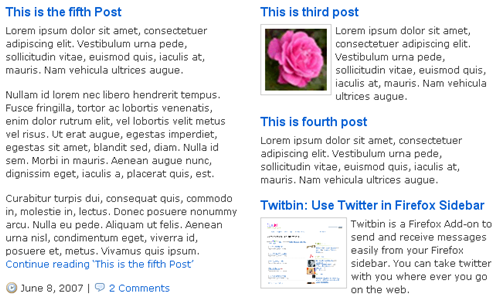
3 Other Articles
Use the same code as above but in the first line where numberposts=1 change that value to 3. Scale down the images to smaller sizes using CSS otherwise they will broke your layout.
Now the top section is finished, below that we want to show 4 or 5 articles from each section
We can use the same code here but we don't want to show the content but only title.
<h3>Sections</h3><?php $posts = get_posts( "category=1&numberposts=5" ); ?><?php if( $posts ) : ?>
<ul><?php foreach( $posts as $post ) : setup_postdata( $post ); ?>
<li><a href="<?php the_permalink() ?>" rel="bookmark" title="Permanent link to <?php the_title(); ?>"><?php the_title(); ?></a></li>
<?php endforeach; ?></ul>
<?php endif; ?></code>
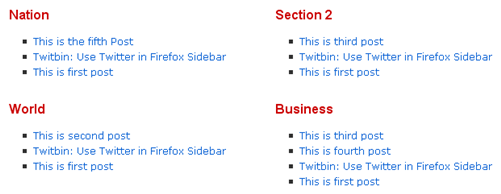
If you prefer the sections in a dhtml way with preloaded content in Tabs, download the tabcontent script from dynamic drive. Place the above used PHP code in tabcontent script div tags.
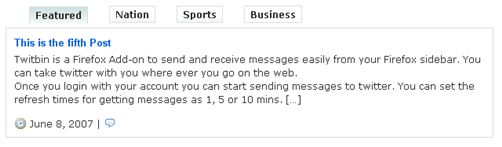
Finally put this code in a page and set your blog home page as this page. Your current theme might be having home.php template, use that one then you don't have to set home page. WordPress first looks for home.php template and then index.php, so if you put this code in home.php your home page automatically shows the front page with your modifications.
Disclaimer: I am not an expert in PHP code and i am not sure whether this is a secure method of doing it, i did not test this theme extensively. Use this code at your own risk.
In my next post i will tell you about some of the useful plugins for turning wordpress in to CMS.
(References Rhymed Code, Codex)


Nice. I’ve used different cms platforms and always wondered how simple it would be to use WP as a cms. I’ll be following this series. Good one buddy.
@Brown
Thanx for the heads up, hope you will find it interesting
Cool.. I’m thinking of suggesting it to couple of people who are running their CMS in Joomla!
wordpress is a good option for CMS
now… this is what called an award winning post!