Powertoys are small add-ons from Microsoft to tweak or enhance your windows XP experience. If you are a serious windows user then you should be using these and these can be downloaded from Microsoft for free. Here is a list of my favorite power toys to increase productivity.
Image Resizer:
You don’t need to open Photoshop for just resizing an Image, Image Resizer enables you to resize single or multiple images with just a right click. After installation you will see a resize picture context menu if you right click any image.
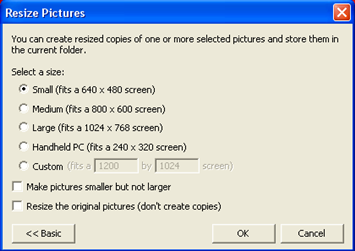
Image: Image Resizer
Alt-Tab Replacement:
This will replaces the default alt-tab switch screen with better user interface, it adds a large thumbnail of the application you are selecting. This is quite useful if you open multiple browser windows and want to switch to the right one without searching for yourself.
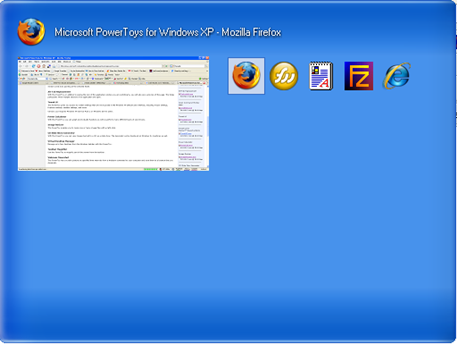
Image: Alt-Tab Replacement
Power Calculator:
Power Calculator has some nice features which are not there in the standard winxp calculator. With this powertoy you can do graphing, measurement conversions, trigonometry functions and other scientifique calculations.
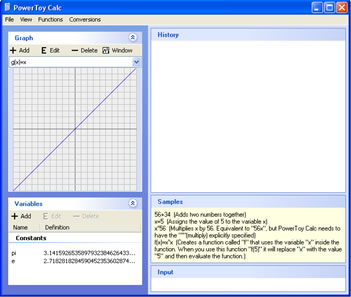
Image: Power Calculator
Tweak UI:
Tweak UI gives you access to system settings that are not exposed in the Windows XP default user interface, including mouse settings, Explorer settings, taskbar settings, and more.
Webcam Timershot:
With this PowerToy you can take take pictures at specified time intervals from a Webcam connected to your computer and save them to a location that you designate.
Download Link


Nice list there. I liked the tab replacement 🙂
Yaah its a nice one, but i feel that its a bit slow compared to standard one
yaawwnn seen it. used it. microsoft had desktop arrangement thingy…forgot the name, it had a little snazzy effects to offer..
I’ve tried all of these 😀
My favourites are the PowerToy Calculator and that TweakUI application. I love them. 😀
I like the Image re sizer and the tab one.
@ Sindhu
You are talking about Virtual desktop manager i guess. I didn’t use it
this is nice, i liked the tab replacement and power calc 😀
I LIKIT THIS SAIT TAHNKS
Thanx vaanika21