I stumbled over a page today that shows a hidden secret browser on windows, i am not sure whether this one is a real hidden browser or it is just an instance of IE. But anyway this works well, you can browse through sites using this browser.
To open this browser you need to open calculator (other programs might also work) and then click help, then click help topics.
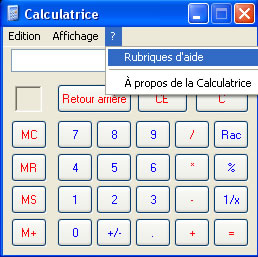
Once you are in help topics click question mark button on the top bar and click Jump to URL. Here you enter the URL of the site you want to go, the site will open in the content area.
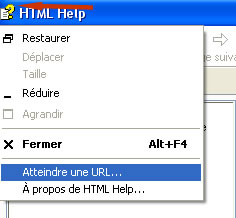
I guess this is just an instance of IE, because i could open flash videos also, if it is a separate browser it will ask for the Flash player plugin. This is just my guess, any how it is an interesting find.

Source: BareChoons


Pardon me to oppose you but this is not a hidden secret Browser in Windows 🙂
Its the Windows Explorer which lets you access Internet when you are connected to it
Even if you were not using Windows Calculator and were using some other Windows program, you still would have been able to browse the Internet through its Help file
Just like open My Computer and type http://www.sizlopedia.com in the address bar and see the magic 😉
@DJ
Thanks for the info, i doubted something like this.
Good find Ram, but as DJ said, its not hidden. 😀
In fact it is a hidden browser, when using DJs trick it brings up IE but if IE is disabled or damaged you are still able to browse using the calculator or any other app thats uses the same type of help such as notebook.
This does not work in Windows 7. The option to go to a URL is not provided any longer.