We have large music collections sitting in our computers, you can put some of this collection but not all on iPod or other music devices. It would be great if we can access all our music collection from anywhere, JukeFly does the same.
With JukeFly you can access your music collection from anywhere using any browser. Using JukeFly is easy, create an account with JukeFly, download the small server software and install. After installing the software select your music folder, thats all now you can access your music from JukeFly website.
This software syncs the meta data of your music collection to their servers. JukeFly has some social features also if you are want to see what your friends are listening. You can listen, browse their music catalogue and find other users who have similar interests like you. Source: LifeHacker
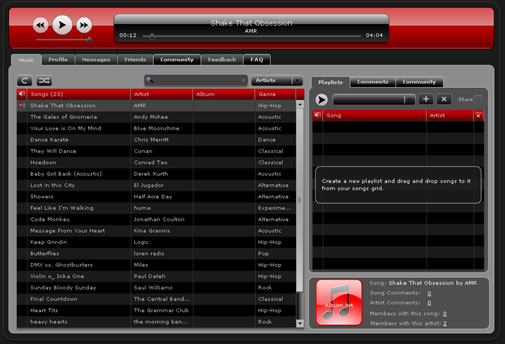


Nice! I love the layout of JukeFly
Great service! The interface is nice, simple and clean. I have so far found the sync’g to be fairly quick. I did have a few moments of confusion as to how to get the sync’g going at first. Maybe I am still asleep, but the sync feature being on the Profile page was not intuitive to me.
Playback has been smooth so far even though I have experienced one hang between songs. I had to reload the page to get playing again. Sound quality is decent, although an EQ would be nice.
I see the potential for this to long term replace Media Monkey for my home music needs. Okay, maybe way long term.
This is great. I don’t know about this software before. Thanks for sharing and keep on posting. 🙂