EverNote is a nifty and powerful application to take Notes, web clips, Images. EverNote earlier available as a windows app but now they have introduced web based version and currently it is in private beta. I got a chance to see the EverNote Beta version and i am really impressed with it.
With EverNote you can take Notes, highlight text on web pages to clip it, or take a picture from your phone and send it to your PC or the web. EverNote automatically synchronizes the data, so wherever you are you have the same copy of your notes or clips. The most impressive part of this app is its search for printed and handwritten text within images. You can take pictures of business cards, or anything you want to save as a notes, later you can use text keywords to search with in these pictures.
Desktop App
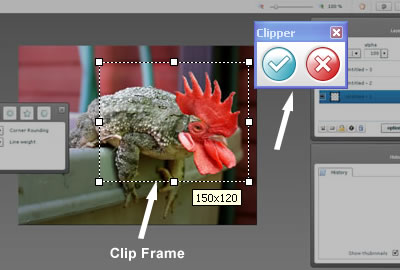
With EverNote Desktop app you can organize your notes, search, save clips. EverNote desktop has a feature called “Universal Clipper”, click to open this Clipper it will sit in your system tray, whenever you want to clip something click the clipper to clip it or double-click it to open the clipper. Click on the clipper frame button to select a frame of anything you want to clip. You can clip web page, text, images anything you want. It will be automatically sent to evernote.
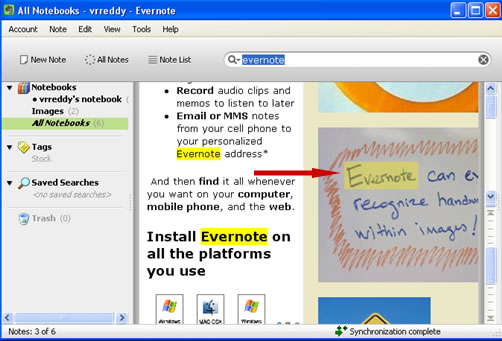
When you search for something it will highlight everything related to the term including the text within images. See the below screenshot.
Web Version
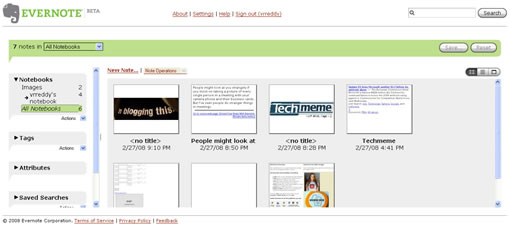
The webbased version is little rough but it just works. Ajax is used for the navigation and editing of the notebooks. The web version is pretty fast, you can esily navigate, edit your notebooks easily. In the left sidebar you will find all your notebooks, tags, attributes if any and saved searches. You can see all your stuff in the main content frame, you can arrange all your notebooks either listtype, or thumb view or as a single frame. You can easily navigate between notebooks, add tags etc. You can drag a javascript bookmarklet to your browser toolbar to clip from the web pages.
Mobile App
 I didn’t test Mobile app so far, it will also do notes, clips. You will get a unique email to send notes from your mobile phone. Add this email address in your phone address book, so that you can send all those cool pictures to your evernote.
Currently EverNote is available for Windows, Web and Windows Mobile Phones. Mac version and a version for Java phones is will be released in the near future.
Overall the application is very useful for saving anything whenever you want. Search functionality is really impressive. This is the best note taking software i have ever used.
You can request a beta invite for evenote here


[…] Evernote is a powerful application to take notes, web clips and images. Review: EverNote: Notes, Web Clips for Windows, Mac, Mobile and Web […]