Locked files generate error messages like Access is denied, or a sharing violation or the source or destinaltion file may be in use. These errors will popup when another program is accessing the file, you can get rid of it by closing the program in question. But windows doesn’t show which program is using the specified file. If you want to move, rename or delete these locked files you can’t do it. UnlockMe is created just for that it enables you to delete, move or rename locked files by unlocking them.
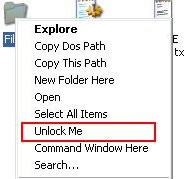
UnlockMe integrates in to the windows right-click menu, whenever you encounter a locked file you can right-click and unlock the file. The locked file or folder will be unlocked immediately.
UnlockMe is a freeware works with Windows XP/Vista


[…] [Via] heyos_ad_user = 8808; heyos_ad_type = “G”; heyos_ad_format = “1”; heyos_color_border = “5BBF00”; heyos_color_bg = “F5FFEC”; heyos_color_link = “005B88”; heyos_color_text = “000000”; heyos_color_url = “0033FF”; Post similiNessun post simile Scrivi un commento […]