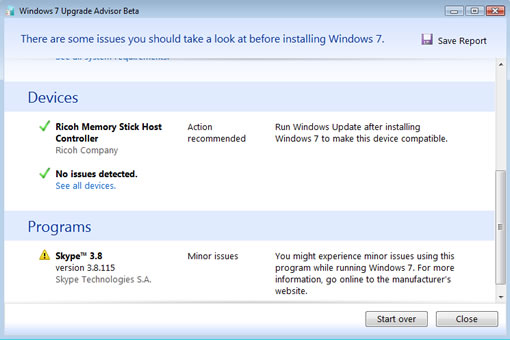
Microsoft released an app called Windows 7 Upgrade Advisor beta which tells you whether your system is capable of running Windows 7 or not.
The Upgrade advisor examines system processor memory, storage, and graphics card for compatibility with Windows 7 and advises how to resolve if there is any issue with any of them. It also checks for compatibility of software programs, and devices connected to the computer. While testing connect devices like printer, scanner etc to check their compatibility with windows 7 to avoid surprises later.
If you are already running Vista, it will tell you if you can upgrade from Vista to Windows 7 with out a clean install. If you are running Windows XP then you need to do a clean install of Windows 7.
Windows 7 doesn’t demand resources like Vista does, so a system with IGB of RAM will do with enough hard drive space.
These are the official requirements for running Windows 7 if you don’t want to install this advisor.
- 1 GHz or faster 32-bit (x86) or 64-bit (x64) processor
- 1GB RAM (32-bit) / 2GB RAM (64-bit)
- 16GB available disk space (32-bit) / 20GB (64-bit)
- DirectX® 9 graphics processor with WDDM (Windows Display Driver Model) 1.0 or higher driver
Download Windows 7 Upgrade Advisor, it works on Windows XP and Vista and requires .Net Framework.


[…] [Via] heyos_ad_user = 8808; heyos_ad_type = “G”; heyos_ad_format = “1”; heyos_color_border = “5BBF00”; heyos_color_bg = “F5FFEC”; heyos_color_link = “005B88”; heyos_color_text = “000000”; heyos_color_url = “0033FF”; Post similiCosa ne Pensate di Windows 7?Download gratuito di Windows 7 RC [Funziona fino a Giugno 2010]Windows 7 RC Richiederà Veramente Poche Risorse“Ottimizzare” il pc serve veramente?Come Velocizzare Windows 7 in Pochi e Semplici Passi Scrivi un commento […]