If you love Gmail and looking for an easy solution to move or copy all your emails from other email providers now there is a simple solution from Gmail. Gmail introduced a new feature that you to import emails and contacts from your other email providers like Yahoo Mail, Hotmail, AOL mail and several others.

To import mails go to Gmail -> Settings –> Accounts and Import tab and click the import mail and contacts button. The import process may take 24-48 hours, once complete you will receive a confirmation message at the top of your inbox. After importing Gmail allows you to receive new emails from your old email to new Gmail account for 30 days.
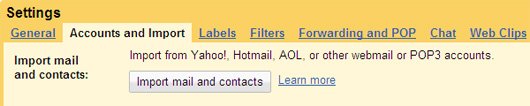
This feature is only available for new Gmail accounts at the moment, it will be available to all users in the next few days.
Email providers that you can import to Gmail:
aol.com, aol.fr, clear.net.nz, cox.net, comcast.net, cs.com, earthlink.net, freenet.de, freeserve.co.uk, gmx.at, gmx.ch, gmx.de, gmx.net, hotmail.com, hotmail.co.uk, hotmail.de, hotmail.fr, Ihug.co.nz, juno.com, laposte.net, live.com, msn.com, netscape.com, netzero.com, neuf.fr, optonline.net, optusnet.com.au, orange.fr, orangehome.co.uk, orcon.net.nz, paradise.net.nz, rr.com, slingshot.co.nz, sprint.ca, sympatico.ca, tiscali.co.uk, verizon.net, voila.fr, wanadoo.co.uk, wanadoo.fr, web.de, worldnet.att.net, yahoo.com, yahoo.co.uk, yahoo.co.in


[…] :: teknobites Share and […]