With Windows 8, Microsoft has introduced the new Start screen along with the new metro UI. Microsoft has also introduced a new category of apps called the metro apps. These apps are not only full screen but are fast and fluid as well.
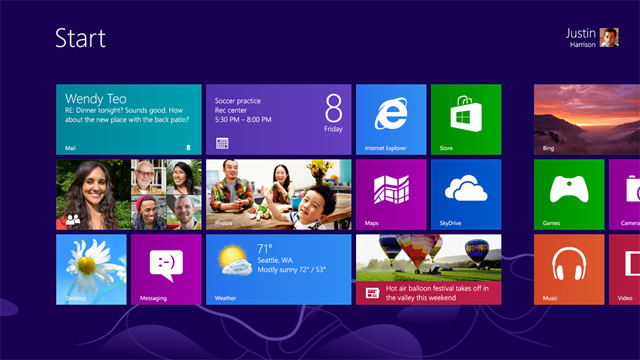
Metro apps can be launched only thorugh the new start screen, that has been introduced in Windows 8. The start screen acts as a dashboard and the user can pin any metro app there. Microsoft hasn’t provided any option to pin the metro apps on the desktop. Launching metro apps from the start screen is a bit time consuming as the user have to first open the start screen, look for the required app, and then open the metro app. The process could be easy if the number of installed apps is low; however, if you have a significant number of apps installed, looking for the one you want to launch can become a tedious task.
Wouldn’t it be easy if you could pin the metro apps as a shortcut icon on your desktop? Well, we are here with a free utility which can do this for you. The free utility is known as MetroApp Link and it is a portable utility so you need not install the app. Wondering how the app works?
1. First of all download the utility from here and launch it. The app will populate a list of all the installed metro apps.
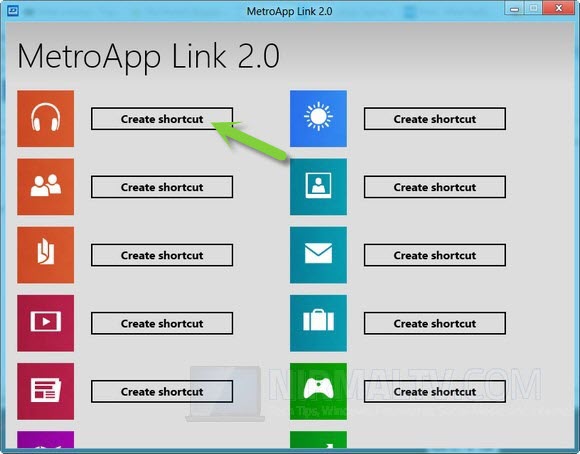
2. Just click on the Create Shortcut Button and instantly the shortcut of the app will get added to your desktop.
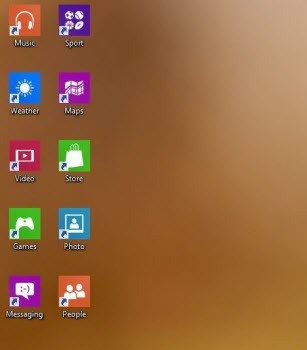
That’s it. Now you have successfully added the shortcut of your desired metro app on your desktop.
Download MetroApp Link Here
