Technology Bites

  • Home
  • Tech
    • Software
    • Browsers
    • Google
    • Internet
    • Windows
  • Mobile
    • Android
    • Apple
    • Windows Phone
  • Products
    • Phones
    • Tablets
  • TIP US
You are here: Home / Software / Create and Manage Keyboard Shortcuts with HotKeyZ

Create and Manage Keyboard Shortcuts with HotKeyZ

HotkeyZ is a freeware application for setting keyboard shortcuts for any tasks in windows. Using HotkeyZ you can create, manage hot keys to launch programs, control applications, shutdown your system etc.

HotkeyZ comes with preset categories including Control Panel, Desktop Window, HotKeyZ commands, Internet, Shutdown options, Sound and System. You can control files, folders or run commands using this handy utility, iit also allows you to launch applications in Normal, Minimized or Maximized states. It supports parameters, while opening a browser you can set the parameter to open Google.com. You can also disable some of the hotkeys with out deleting it.
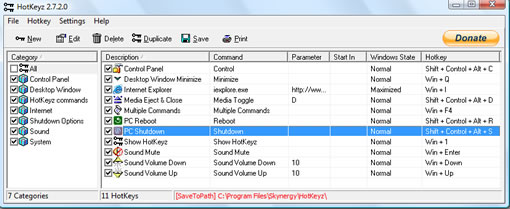
Hotkeyz

There are several application launchers to quickly launch programs to increase productivity, this one is good if you prefer to use keyboard shortcuts for launching and controlling applications.
Download HotKeyZ, [Via cNet]

Share this:

  • Tweet

Related

About Ram

I am a blogger and Technology Enthusiast. I write about software, tech news, gadgets. You can reach me at ram@teknobites.com, follow me on Google+ or on Twitter

« Firefox hits 20% browser market share
Add Tabs to PuTTY with PuTTY Connection Manager »

Top Posts

  • Fake Windows 8 - A Must Have Android App for Windows 8 Lovers
  • Facebook update brings Instagram, Tumblr, Pinterest and Flickr content to home screen
  • Accessibility Clickjacking Android Malware impacts 500 million Android devices
  • 20 Open Source Windows Apps For You
  • Updating.me Allows You to Update All Your Micro-Blogging Services
  • Yahoo new home page
  • Olive Telecom Launched Android based 3G tablet in India
  • HTC Android 4.0 update timeline
  • Samsung Galaxy Chat announced, Android 4.0, QWERTY Keyboard
  • Optimize Tool Box - The All-in-One Performance Utility for Android

About Us · Archive · Disclaimer & Privacy Policy · TIP US · Copyright © 2026 · Technology Bites