Technology Bites

  • Home
  • Tech
    • Software
    • Browsers
    • Google
    • Internet
    • Windows
  • Mobile
    • Android
    • Apple
    • Windows Phone
  • Products
    • Phones
    • Tablets
  • TIP US
You are here: Home / Software / Batch Download Flickr Photos with Flump

Batch Download Flickr Photos with Flump

Flump is a Adobe AIR application that lets you download Flickr photos of any Flickr user to your hard drive.

Using this app is straightforward, enter the flickr username or ID and specify the location in your hard drive to store photos and start flump. If you don’t know your Flickr ID you can get it here.
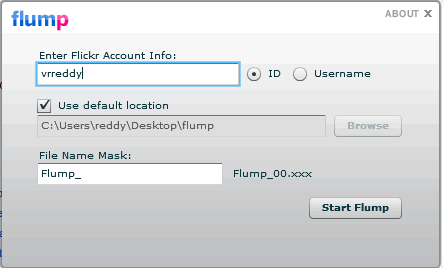
Flump Adobe Air App

Currently it can only download the original image source, that means for it to download images Flickr account owner has to set their account permissions to allow the original images to be downloaded.

Flump is simple to use than many other tools, its perfect to take a backup of your Flickr photos.

Share this:

  • Tweet

Related

About Ram

I am a blogger and Technology Enthusiast. I write about software, tech news, gadgets. You can reach me at ram@teknobites.com, follow me on Google+ or on Twitter

« IZArc: Free Archiving Tool
OperaTor: Portable Browser for Anonymous Browsing »

Top Posts

  • Nokia Lumia 720 Review
  • gDocsBar for Managing Google Docs in Firefox Sidebar
  • Install Additional Language Packs in Windows Vista Home or Home Premium
  • Vistalizator: Get Additional Language Packs for Windows Vista / 7
  • Amazon Fire TV Set-top box launched for $99 to rival Apple and Google
  • Allway Sync: Backup and File Synchronization Software
  • Facebook to Release New Premium Ads Product
  • LG Announces Optimus 4X HD, Tegra 3, Android 4.0
  • Chrome for Windows 8 Metro is Coming
  • Report: Samsung Galaxy Gear to be unveiled on September 4th

About Us · Archive · Disclaimer & Privacy Policy · TIP US · Copyright © 2025 · Technology Bites