Game Booster is a free application for users who are in to serious gaming. This application was designed to optimize the PC performance by tweaking the windows for smoother gaming experience.
What Game Booster does is, it shuts down unnecessary background processes, cleans up the RAM and intensifies the processor performance. These tweaks are not only useful for gamers but for any one who wants to run intensive applications or increase system performance.
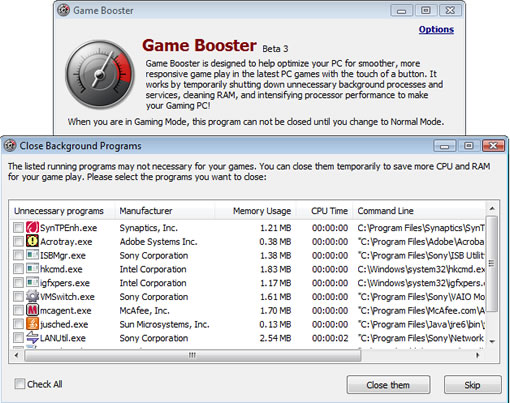
After installing fire up the application and select “Switch to Gaming Mode”, it will show you a list of processes running which are not useful for your gaming experience, you can shut them off all at once or some of the processes.
Game Booster is a freeware for Windows XP/Vista


A link would be good?
Um, Google is your friend. Seriously, it’s a lot easier (and faster!) to actually use the time you wasted bitching about there not being a link to type “Game Booster” into Google.
But at any rate…www.iobit.com/gamebooster.html
Now, this is made by the same people who make Smart Defrag and Advanced System Care (personally, I liked Advanced WindowsCare 2, but that’s just me) – I’ve been trying it on an old clunker, and indeed, it gives a few FPS here and there – but I would disconnect my machine from the internet while using this tool if you don’t know what you’re doing – disabling certain services and programs can have some hefty security implications (i.e., shutting down your A-V, Firewall, etc.). Basically, be careful with what you disable using this tool – it IS in beta, and it *does* muck about with system services – only disable those programs and services that you KNOW to be non-essential to your system’s operation/security.
@ Steve
Thanks for the comment, i forgot to add the link.