Technology Bites

  • Home
  • Tech
    • Software
    • Browsers
    • Google
    • Internet
    • Windows
  • Mobile
    • Android
    • Apple
    • Windows Phone
  • Products
    • Phones
    • Tablets
  • TIP US
You are here: Home / Browsers / Power twitter Firefox Addon

Power twitter Firefox Addon

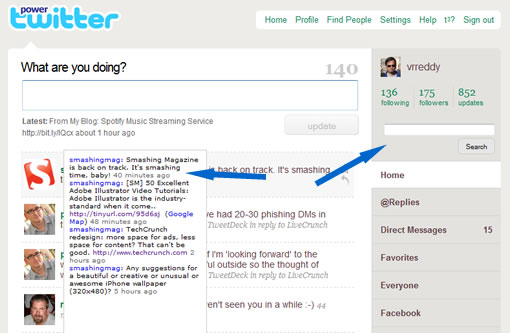
Power twitter is a Firefox add-on that enhances twitter with a search box on twitter timeline and with other nifty features. If you use twitter a lot install this add-on to get most out of twitter.

After installing the addon, it adds a twitter search box to the page, you can directly search with this box and the results are displayed on the same page. When you visit other twitter user pages it allows you to search only that user tweets which is really helpful. Other important features of this extension is it adds the page title of the link you are about to follow, so you will know where you are going.

It also displays Flickr pics, YouTube videos, twitpic pics inline, you don’t have to click to see that pic your friend has sent you. When you hover your mouse on friends avatars it shows their recent activity.

Download the extension from here.
Share this:

  • Tweet

Related

About Ram

I am a blogger and Technology Enthusiast. I write about software, tech news, gadgets. You can reach me at ram@teknobites.com, follow me on Google+ or on Twitter

« Disable Startup: Monitor and Manage Windows Startup
Launch Websites with Keyboard Shortcuts »

Top Posts

  • WPtouch: Wordpress theme plugin for iPhone
  • BSNL and Pantel Launch 3 Tablets
  • BannerSnack Flash Banner Creator Free Licenses Giveaway
  • Gmail Goes Offline Finally
  • Vote for Mashable's 2nd Annual Open Web Awards
  • Google Play Editions of HTC One and Samsung Galaxy S4 receiving Android 4.3 OTA update
  • iPhone Theme Maker: Make Your Own iPhone Theme
  • How to Sync MS Office documents with Google Docs
  • HTC One getting Android 4.4.2 update in France
  • Huawei Honor 3 Official in China, 1.5GHz Quad Core, 13MP Camera Android 4.2.2

About Us · Archive · Disclaimer & Privacy Policy · TIP US · Copyright © 2026 · Technology Bites


Loading Comments...