Technology Bites

  • Home
  • Tech
    • Software
    • Browsers
    • Google
    • Internet
    • Windows
  • Mobile
    • Android
    • Apple
    • Windows Phone
  • Products
    • Phones
    • Tablets
  • TIP US
You are here: Home / Google / Read News (Really) Fast with Google Fast Flip

Read News (Really) Fast with Google Fast Flip

Google Fast Flip is a web application that lets you quickly read and flip through bundles of news articles. Its interface combines the best qualities of both print and web media. It gives you the ability to flip through news articles online quickly, just like you do with a print magazine. It enables you to discover new content, follow friends and topics, and create your own custom magazines.
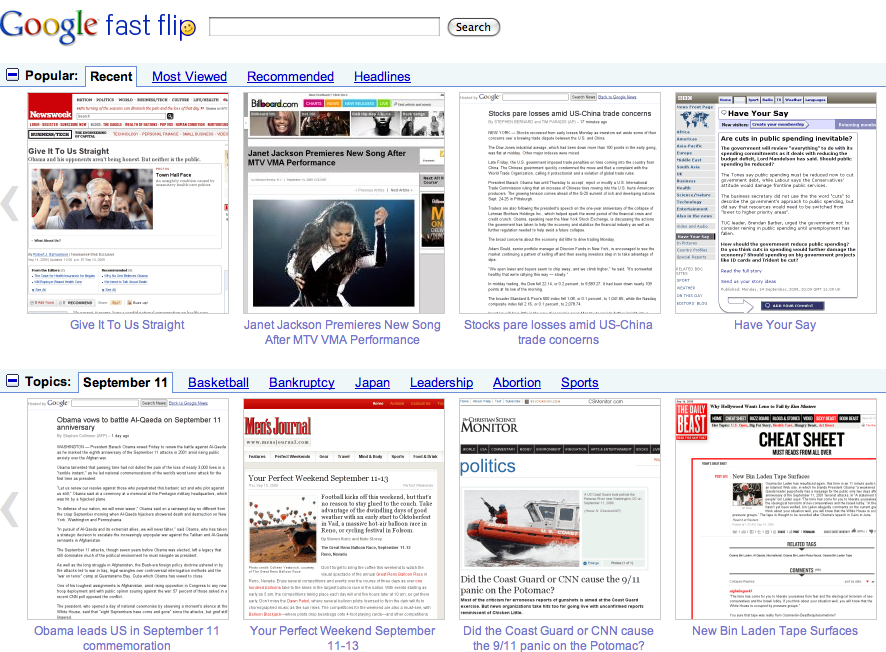
google-fast-flip

Fast Flip personalizes the experience for you, by taking cues from selections you make to show you more content from sources and journalists that you seem to like.

You can sequentially browse through latest news items, headlines and popular topics from various news sources and publishers. It allows you to flip through content very fast, so you can quickly look through a lot of pages until you find a topic of your interest.

There is also a mobile version of Fast Flip with tactile page flipping for Android-powered devices and the iPhone, so that you can browse on the move.

So, are you ready to give Google Fast Flip a spin?

Share this:

  • Tweet

Related

« Voice Chat Coming to Facebook
Microsoft Office Web Apps Technical Preview Started Today »

Top Posts

  • Temple Run 2 for Windows Phone is now available
  • Grooveshark Lite: Online Music Streaming Service
  • Gmail Backup Software
  • How to Flash Ubuntu Touch Developer Preview on Galaxy Nexus, Nexus 4, 7, 10
  • Yahoo Mail Applications
  • TweetVolume Tells You The Most Popular Twitter Client
  • Upload files to multiple hosts from your desktop
  • 10 Free Scripts to Create Your Own Url Shortening Service
  • Yahoo home page redesign is working
  • Samsung Galaxy S III Review Roundup

About Us · Archive · Disclaimer & Privacy Policy · TIP US · Copyright © 2026 · Technology Bites


Loading Comments...