Technology Bites

  • Home
  • Tech
    • Software
    • Browsers
    • Google
    • Internet
    • Windows
  • Mobile
    • Android
    • Apple
    • Windows Phone
  • Products
    • Phones
    • Tablets
  • TIP US
You are here: Home / Google / Upload and Share PDF Files with Google Docs

Upload and Share PDF Files with Google Docs

Now you can upload, preview and share PDF files using Google Docs. Editing of the PDF files is not yet there, but you can copy & paste text from them.

This is the most requested feature for Google Docs, PDF support will be liked by most of the Google Docs users as this is the popular format for sharing documents with others.

To upload a pdf click on upload and select PDF file from your computer or provide a web url to upload. Maximum file size you can upload is 10MB from your computer and 2MB from web.
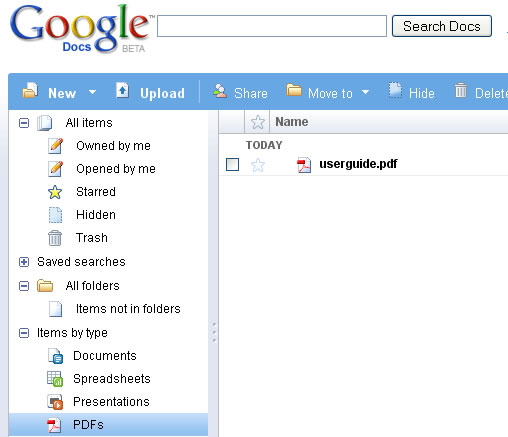
Google Docs PDF Support

Share this:

  • Tweet

Related

About Ram

I am a blogger and Technology Enthusiast. I write about software, tech news, gadgets. You can reach me at ram@teknobites.com, follow me on Google+ or on Twitter

« SugarSync: File Syncing Across Multiple Devices (3 Accounts Giveaway)
Firebug for Firefox 3 »

Top Posts

  • Contact
  • HomeFlip - Next Level Multitasking on Android
  • Disclaimer & Privacy Policy
  • Google Launches Android Open Platform for Mobile Devices
  • Bharti Airtel Launched 4G Services in Bangalore
  • Nokia Lumia 1520 arrives on AT&T for $199, pre-order now
  • Download Mahjong for Free - Time Waster
  • Xolo launches Nvidia Tegra-4 powered Tegra Note at Rs 17999
  • SugarSync: File Syncing Across Multiple Devices (3 Accounts Giveaway)
  • Subway Surfers now available for Windows Phone

About Us · Archive · Disclaimer & Privacy Policy · TIP US · Copyright © 2025 · Technology Bites