Technology Bites

  • Home
  • Tech
    • Software
    • Browsers
    • Google
    • Internet
    • Windows
  • Mobile
    • Android
    • Apple
    • Windows Phone
  • Products
    • Phones
    • Tablets
  • TIP US
You are here: Home / Google / Blog.gears: Blog offline with Google Gears and Blogger

Blog.gears: Blog offline with Google Gears and Blogger

Blog.gears is an offline Blogger client which allows users to write posts offline. This is very useful feature if you don’t have net connection all the time.

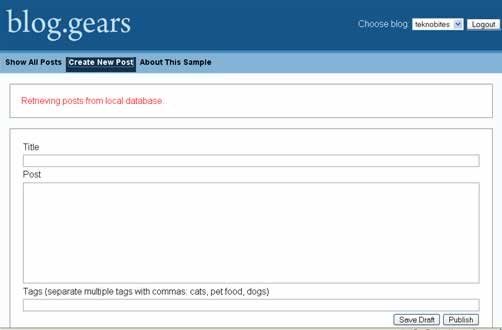
In order to use this feature you need to install Google Gears first. If you have Google gears go to Blog.gears and click on the link login, it will ask you to grant access to blogger. Once you permit it to access it you can start posting new posts or edit the older posts. If you are connected to the internet you can immediately publish the posts. See the screenshots to see how it works. (I have created a dummy blog to test these features.)

Google Gears supports Google reader and now they have added support for blogger, next may be gmail 🙂
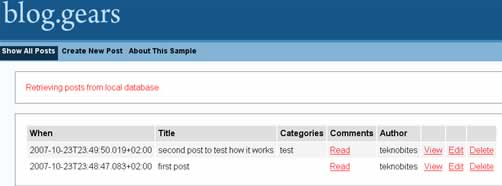
blog.gears

blog.gears editor

Via Google Gears API Blog

Share this:

  • Tweet

Related

About Ram

I am a blogger and Technology Enthusiast. I write about software, tech news, gadgets. You can reach me at ram@teknobites.com, follow me on Google+ or on Twitter

« Get Windows Vista Look For Windows XP
RoundUp: 13 Online Photo Editors »

Top Posts

  • Cyanogenmod ROM: Overview and Features
  • Samsung Galaxy Grand 2 with 5.25-inch Display launched in India, available from January 2014
  • Leaked Nokia Lumia 1020 image reveals Nokia Pro Cam app
  • Report: Google working on Android game console, smart watch and NexusQ
  • Micromax to launch Canvas Tube A118R with 5.5-inch display soon
  • Asus FonePad 7 launched in India at ?17499
  • Recover deleted files with Pandora Recovery
  • How to Uninstall or Remove Windows 8 Consumer Preview from Dual Boot setup
  • Nokia Lumia 1520 arrives on AT&T for $199, pre-order now
  • Google Presentation App Goes Live

About Us · Archive · Disclaimer & Privacy Policy · TIP US · Copyright © 2026 · Technology Bites