Technology Bites

  • Home
  • Tech
    • Software
    • Browsers
    • Google
    • Internet
    • Windows
  • Mobile
    • Android
    • Apple
    • Windows Phone
  • Products
    • Phones
    • Tablets
  • TIP US
You are here: Home / Tech News / Create you own digital newspaper with feed chronicle

Create you own digital newspaper with feed chronicle

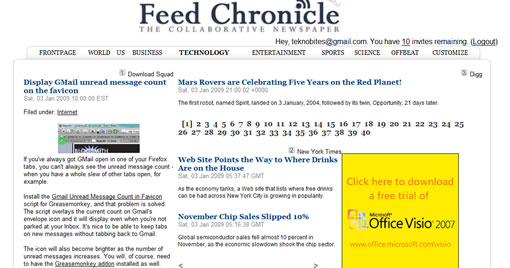
Feed Chronicle is a new service that allows users to have a kind of digital newspaper with their feeds, well actually you can’t add feeds right away (you can suggest) yet but you have to select from the predefined list of sources. The design looks like traditional newspaper site with ads thrown in here and there.

Do we really need this, not sure but it may be interesting to some users, if you consume lot of feeds this is definitely not for you. You need to register to use the site. Once logged in you will see your personal newspaper, you can customize the feeds using customize link from the menu.

Feed Chronicle has 8 sub sections apart from front page. You can add only 5 feeds for any section why?.

A better way to get a digital magazine is using Tabbloid, it will send a PDF file of your favorite feeds arranged in magazine style.
Share this:

  • Tweet

Related

About Ram

I am a blogger and Technology Enthusiast. I write about software, tech news, gadgets. You can reach me at ram@teknobites.com, follow me on Google+ or on Twitter

« Download Free PDF to Word Converter
Spotify Music Streaming Service »

Top Posts

  • Micromax Canvas Knight A350 with Octa-core processor announced in Russia
  • Twitter for Windows Phone updated with Lens, Photo filters support
  • How to edit php.ini file to increase memory limit
  • Google Presentation App Goes Live
  • Send Free SMS Text Messages To The World With Jaxtr
  • Monitor System Processes with Process Explorer
  • Visit Ancient Rome in 3D with Google Earth
  • Firefox 4 interface mockup designs
  • Manage Online Event Registrations Easily with Eventzilla
  • HTC announces Windows Phone 8X and 8S

About Us · Archive · Disclaimer & Privacy Policy · TIP US · Copyright © 2026 · Technology Bites


Loading Comments...