Technology Bites

  • Home
  • Tech
    • Software
    • Browsers
    • Google
    • Internet
    • Windows
  • Mobile
    • Android
    • Apple
    • Windows Phone
  • Products
    • Phones
    • Tablets
  • TIP US
You are here: Home / Software / Customize Start Menu with Tidy Start Menu

Customize Start Menu with Tidy Start Menu

If you use lot of programs then chances are that your start menu is so long that you hate to look at it. But not any more Tidy Start Menu will help you to keep your start menu in order by categorizing the programs.

For setting the menu in order, the program offers you to categorize the Menu. For example, the Internet programs can be put into the “Internet” category, while all games can be included in the “Games” category. Thus, after using the program, you will have a compact menu, which will contain nothing but categories’ names.
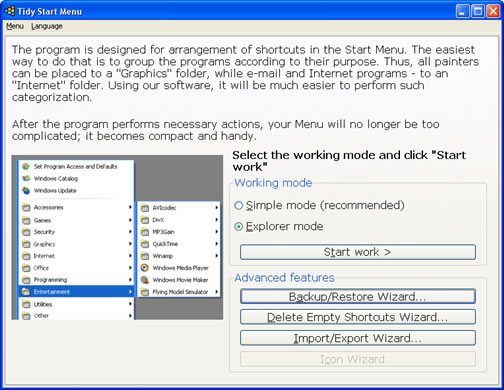

tidy start menu

I would suggest to take a backup of your start menu before going to use this app so that you can revert back to your original menu if you don’t like what it does. You can also hide some programs from other users of the computer if you wish.

This tools is available as free and a pro version for all windows versions. Free version works well with some limitations and pro version will cost you $19.95 with some additional features.

Share this:

  • Tweet

Related

About Ram

I am a blogger and Technology Enthusiast. I write about software, tech news, gadgets. You can reach me at ram@teknobites.com, follow me on Google+ or on Twitter

« Best of Technology Bites 2007
How to share files with out uploading anything »

Top Posts

  • Download 10000 Free Shapes for Photoshop
  • DSP Manager: The Best Equalizer app for Android
  • Beats Audio and Sony Xloud enhancement for ALL Android ROMS
  • Super Status Bar - A Better Status/Notifications Bar for Android
  • Voxer Push-to-Talk app for Windows Phone
  • Android 4.3 update for Sony Xperia Z and Xperia ZL leaked online
  • Dropbox launches Smart Sync for business customers, takes Paper out of beta
  • Omega StatusBar for Android 2.1+ - A Highly Customizable Status Bar (Themes Support)
  • Sony Walkman Player for Android Ice Cream Sandwich and Jelly Bean
  • VTL Launcher - The First Android Launcher Designed for Tablets

About Us · Archive · Disclaimer & Privacy Policy · TIP US · Copyright © 2026 · Technology Bites