Technology Bites

  • Home
  • Tech
    • Software
    • Browsers
    • Google
    • Internet
    • Windows
  • Mobile
    • Android
    • Apple
    • Windows Phone
  • Products
    • Phones
    • Tablets
  • TIP US
You are here: Home / Software / Free Extended Task Manager for Windows

Free Extended Task Manager for Windows

Free Extneded Task Manager is a freeware utility for windows that gives additional features than the default windows task manager. This gives additional management features and information about disk activity and network port usage.

The summary page of the application includes the list of running programs, CPU usage, page file usage, disk I/O usage and network performance etc. The other tabs of the program show the detailed information about the running processes, ports, users etc. The performance tab shows the Disk I/0 graph which gives the information of which programs are using most disk at the moment.
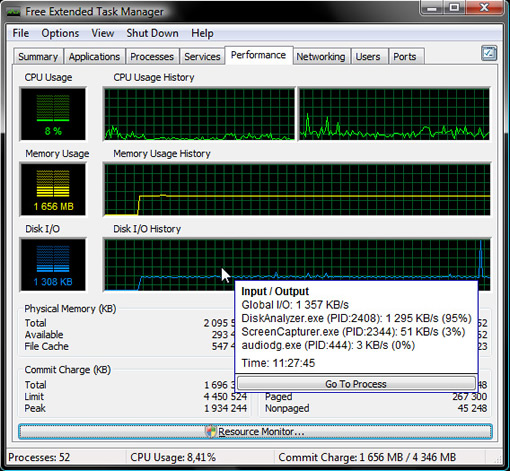
The network port monitoring available from the ports tab allows you to see who is connected to your computer and from which IP address. It has another useful feature that allows you to see which program has locks a file because of that you are not able to delete or rename the file.

Free Extended Task Manager is a freeware utility for windows which serves as an alternative to windows task manager. [Download]

Share this:

  • Tweet

Related

About Ram

I am a blogger and Technology Enthusiast. I write about software, tech news, gadgets. You can reach me at ram@teknobites.com, follow me on Google+ or on Twitter

« Hard Drive Eraser: Erase Data Permanently
Google Search is Broken: Thinks whole web is malware infected »

Top Posts

  • Samsung updates Galaxy S4 firmware, Apps to SD and more
  • Create Your Own Internet Radio Station with ubroadcast
  • del.icio.us Plugin for Internet Explorer
  • Lenovo Smart Band HW01 with OLED display launched at Rs 1999
  • Samsung Galaxy S4 getting Android 4.3 update in India
  • About
  • Technology Bites RSS Feeds

About Us · Archive · Disclaimer & Privacy Policy · TIP US · Copyright © 2026 · Technology Bites


Loading Comments...