While browsing the web these days, you would rarely come across any website with just plain text on it. Flat text – nothing else. Well, that was Web 1.0 , we now live in the Web 2.0 age, surfing not only just text, but audio, video, presentations, files, movies and what not!
If you have a blog, you would know how important it is to make your blog engaging and appealing with media such as pictures and videos so that the reader doesn’t get bored. It might not be an easy task, but Apture makes it painless and straightforward.
What is Apture?
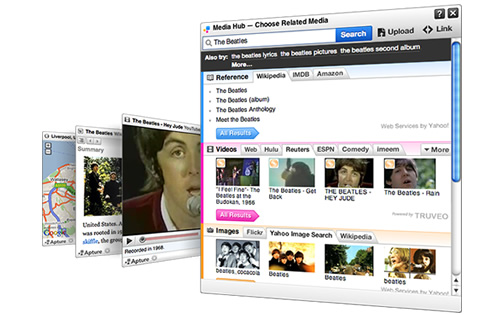
Apture, quite similar to SnapShots, provides a greater deal of features and gives you better choice of integrating content in your blog, through slick and non intrusive javascript pop-outs, that are designed as per the linked content. Created especially for media publishers, including bloggers, Apture is used by big players such as WashingtonPost, BBCNews etc.
What does it do?
Apture makes it easy adding third party content through an on site editor. A plugins takes it to work, already supporting the major blogging platforms like Blogger, WordPress, Typepad, Movable Type and Joomla. After you have installed the plugin and made an account with them, open the page where you want to add links and multimedia and through a sleek on screen dashboard and editor, you can easily turn text on your site into intuitive information pop-ups.
Features
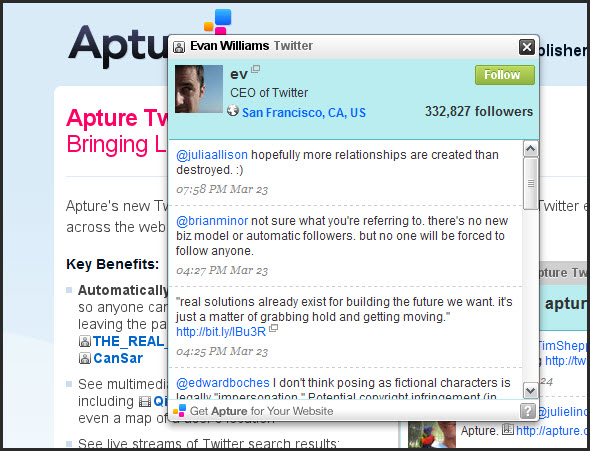
When the reader hovers his mouse pointer over the Apture-ed link, a small box pops out with the linked information. For example, if a wikipedia page is linked, the popup will include information about it, including the first introductory para, with the second para linked. In case of flickr links, the photo is displayed, twitter links:tweets are shown, twitter profile links: a profile info box with follow button, show videos onsite with youtube, play music right on your site with a flash player and whole lot more.
What do you think of it?
Apture in all, is a useful and visually appealing way to add off-site media to your site. It may be useful for your readers, but might also become intrusive for some users. Let us know what you think of it.
Apture works for links you want, it adds contextual, off-site information to links that you select. Apture is a free service and customized pro editions are also available.
[ Apture – Add Multimedia to Your Website With One Click ]

kooool thingy!!
We’re listening too – we want to know what you all think of our service, and thanks to Teknobites for the review. We think you nailed all the great points of Apture!
Thanks for dropping by Awais and Colleen, stay tuned for more 🙂