While Windows 8 has great network functionality it has also got an option to turn of all the network connections i.e. take your device to offline mode. This mode also known as Airplane mode allows users to turn off wireless connections so that they won’t interfer with avionics and other ground signals. This mode is also useful for users who want play a game or do some important work with out distraction from browsing and chat messages.
Airplane mode disables all wireless connections including cellular broadband, Wi-Fi and Bluetooth with just a single click. Wondering how to turn it on? Don’t worry, just follow these steps:
1. First of all take your mouse cursor to the upper right corner and wait for the charms bar to begin or Press Winkey+I
2. Here select the Settings charm and then select Change PC settings option located at the bottom.
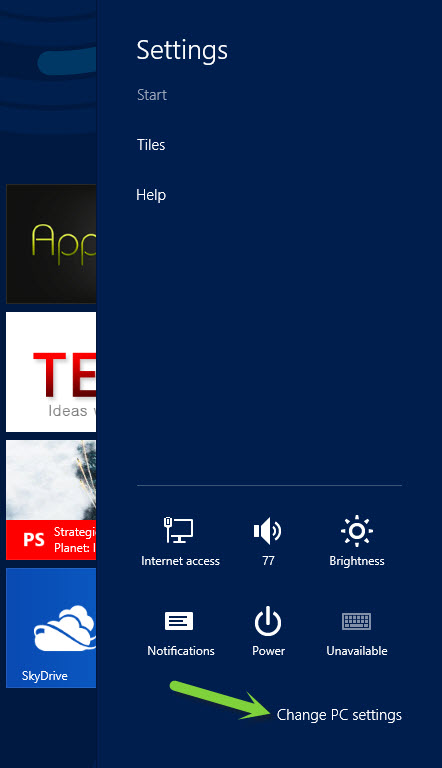
3. This will launch Metro control panel. Here you need to select the Wireless menu from the left navigation pane.
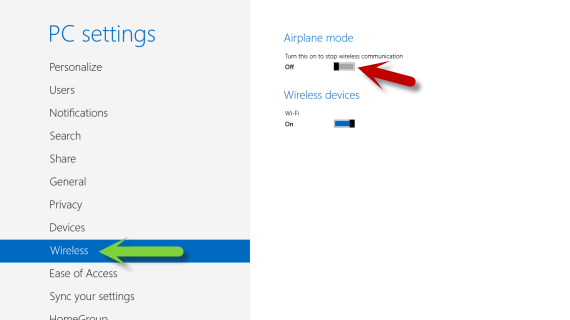
4. Then you will get an option to turn on Airplane mode. All you need to do is to slide the slider towards right to turn on the option.
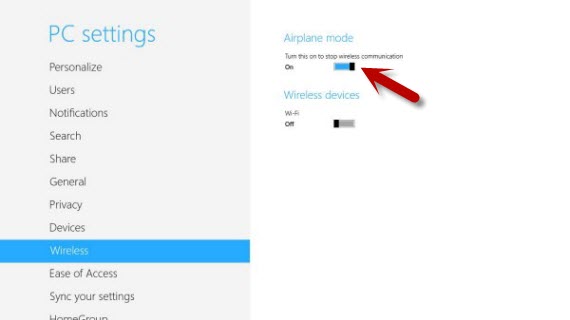
That’s it. You have successfully turned Airplane mode on in Windows 8.
