Technology Bites

  • Home
  • Tech
    • Software
    • Browsers
    • Google
    • Internet
    • Windows
  • Mobile
    • Android
    • Apple
    • Windows Phone
  • Products
    • Phones
    • Tablets
  • TIP US
You are here: Home / Software / Intel Mash Maker: Mashups for the Masses

Intel Mash Maker: Mashups for the Masses

Intel launched a Mash Maker application today as a browser plugin. It is similar to Yahoo Pipes and Microsoft Popfly but can be used inside the browser. The surprising part is that Intel, basically a hardware company launching this mashup creator application. Intel launched a digg clone a while back for software called Cool Software.
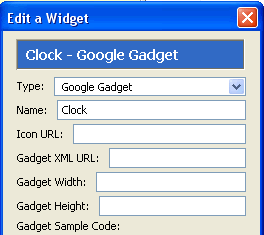
Mash Maker Google GadgetsIt works with Internet Explorer 7 and Firefox, Mash maker is also available as media add-on to windows media player and iTunes.

With this application you can create web mashups using content from various sites. You can customize and control the layout. Created mashups can be shared with friends or can be published to other sites.

You can create mash maker widgets or use widgets created by other users. Google gadgets can also be used as mash maker widgets.
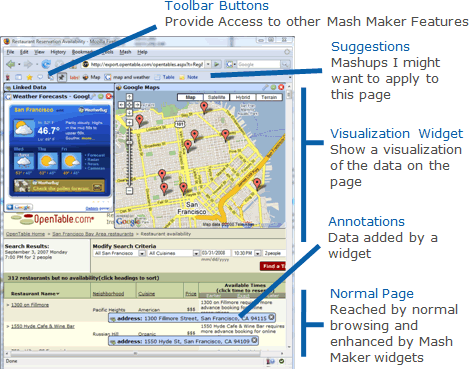
Mash Maker

Share this:

  • Tweet

Related

About Ram

I am a blogger and Technology Enthusiast. I write about software, tech news, gadgets. You can reach me at ram@teknobites.com, follow me on Google+ or on Twitter

« Six Apart Launches an Ad Network and Services for Bloggers
Microsoft Live Mesh Tech Preview Launches »

Top Posts

  • Flickr is Getting a Facelift
  • Download 10000 Free Shapes for Photoshop
  • Microsft Office 15 Technical Preview Screenshots Leaked
  • Identi.ca: Open Source Microblogging Platform
  • Frengly: Free Translation Service
  • Alcatel announces One Touch Idol X, Features & Specs
  • Snapdeal launches multi-lingual mobile site starting with Hindi and Telugu
  • BBC goes web2.0ish with new beta homepage
  • Micromax launches 3D Smartphone Canvas 3D - A115 for Rs 9999
  • Its official, Google Chrome is launching tomorrow

About Us · Archive · Disclaimer & Privacy Policy · TIP US · Copyright © 2025 · Technology Bites