Technology Bites

  • Home
  • Tech
    • Software
    • Browsers
    • Google
    • Internet
    • Windows
  • Mobile
    • Android
    • Apple
    • Windows Phone
  • Products
    • Phones
    • Tablets
  • TIP US
You are here: Home / Software / Kill Runaway Processes with Task Killer

Kill Runaway Processes with Task Killer

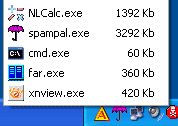
task killerTask killer allows you to kill running processes from your taksbar. It sits in the taskbar as a small icon, clicking that will show the current running processes and their memory usage. You can kill any running process by clicking the name of the application.

It is a good alternative to Windows Task Manager, you can kill running processes with out opening task manager.

Task Killer is a freeware application and only for Windows.

via Lifehacker

Share this:

  • Tweet

Related

About Ram

I am a blogger and Technology Enthusiast. I write about software, tech news, gadgets. You can reach me at ram@teknobites.com, follow me on Google+ or on Twitter

« Translation widgets for your blog
Web Based P2P file sharing »

Comments

  1. Windows Utils says

    I installed this a couple of days ago – it’s really handy. Saves loads of hassle when things like firefox crash!

  2. Shankar Ganesh says

    Nice tool there. I think I’ll be installing it right away, because my computer is running slow and hangs ofen 😀

  3. Madhur Kapoor says

    It will be good to have this for a change.

Top Posts

  • LG Fireweb is the first Firefox OS Phone from LG
  • Bluetooth LE support will come to all Lumia WP8 Phones with Black Update
  • Firefox 10 released with developer tools and full-screen API
  • LG Optimus F5 Global Rollout Begins Today
  • Asus announces Chromebox desktop PC for $179
  • Xolo to launch Q1000S with 1.5GHz Quad Core at Rs. 16,999 to compete with Micromax Canvas 4
  • WhatsApp for Windows Phone gets a major update
  • Yugma: Web Collaboration and Desktop Sharing
  • Oppo N1 will be available internationally from December 10 for $599
  • Accelerate your Web Browsing Experience with FasterFox

About Us · Archive · Disclaimer & Privacy Policy · TIP US · Copyright © 2025 · Technology Bites