Technology Bites

  • Home
  • Tech
    • Software
    • Browsers
    • Google
    • Internet
    • Windows
  • Mobile
    • Android
    • Apple
    • Windows Phone
  • Products
    • Phones
    • Tablets
  • TIP US
You are here: Home / Software / Skype 5.8 for Windows brings Full-HD video calling, Group Screen Sharing

Skype 5.8 for Windows brings Full-HD video calling, Group Screen Sharing

Microsoft released an update for Skype which brings some new features to the popular service. Skype 5.8 for Windows now supports full HD video calling, support for Facebook audio and video calling, other notable feature is Group screen sharing, screen sharing features is only for Skype premium users.

Now with the new update you can make crystal-clear video calls. You need at least 2mbps upload / download internet connection to enjoy this feature. And also you need a webcam that supports full HD video calling.

Group screen sharing allows users to share their entire desktop or selected applications with other users on a conference call while continuing to stream video. To start a group screen share hit +menu  and select “share my screen”
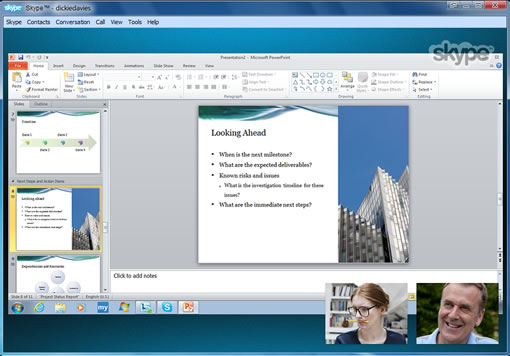
Other features include video calling to Facebook users, you can make video call with all of your Facebook friends even if they are not Skype users. Push to talk feature in Skype allows users to set a hotkey for microphone muting on a Skype call. You can Hide offline Facebook friends in Skype now. This update also brings Bing toolbar integration.

Via Skype blog, Download Skype 5.8 for Windows

Share this:

  • Tweet

Related

About Ram

I am a blogger and Technology Enthusiast. I write about software, tech news, gadgets. You can reach me at ram@teknobites.com, follow me on Google+ or on Twitter

« Google using a Bouncer to keep malware out of Android Market
Dropbox offers 5GB of free space to beta testers »

Top Posts

  • BenQ Android Smarthpones BenQ F3 and A3 available in Taiwan
  • LG's Optimus G Pro headed to US in Q2
  • Microsoft to rebrand ‘Metro’ used in Windows 8 and Windows Phone
  • Holo Locker and Holo Launcher for Android 2.2+
  • 360 Launcher: Simply a better Android Launcher
  • MSN launches new home page
  • Instagram adds better controls for comments, privacy
  • Appetizer: Open Source Application Launcher for Windows
  • Cyanogenmod ROM: Overview and Features
  • Install Additional Language Packs in Windows Vista Home or Home Premium

About Us · Archive · Disclaimer & Privacy Policy · TIP US · Copyright © 2026 · Technology Bites


Loading Comments...