Technology Bites

  • Home
  • Tech
    • Software
    • Browsers
    • Google
    • Internet
    • Windows
  • Mobile
    • Android
    • Apple
    • Windows Phone
  • Products
    • Phones
    • Tablets
  • TIP US
You are here: Home / Gadgets / Split-Screen Technology to Double Computer Use

Split-Screen Technology to Double Computer Use

Folks at Microsoft Research Bangalore, India are developing a software that can split a computer screen in two halves, each half can act as an individual computer with its own operating system, desktop, cursor and keyboard.

This will help small businesses in developing countries like India who have limited resources to deploy several systems.
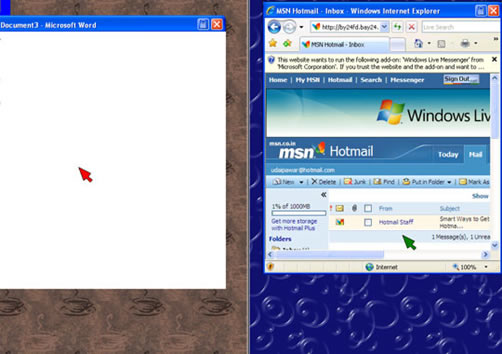
“At the most basic level, we are allowing two users to work completely independently on the same machine, sharing both the processor and monitor,” said Udai Singh Pawar, assistant researcher and project leader.

The solution is software-based and does not require that a company trade their current PC for a new one. They would simply need to install the software and plug in a second mouse and keyboard.

The software enables two sessions of Windows to share the computer’s processor. It also divides the screen in half, running one operating system on the left and the other on the right. If necessary, a user can move her cursor to the other half of the screen, which opens the door on sharing and collaborating with documents.

Source: Discovery News, Image credit: Microsoft Research India

Share this:

  • Tweet

Related

About Ram

I am a blogger and Technology Enthusiast. I write about software, tech news, gadgets. You can reach me at ram@teknobites.com, follow me on Google+ or on Twitter

« Web2.0 Layer Styles for Photoshop
Launchy: Keystroke Launcher for Windows »

Top Posts

  • Lenovo Smart Band HW01 with OLED display launched at Rs 1999
  • Samsung updates Galaxy S4 firmware, Apps to SD and more
  • About
  • Best Firefox 3 Extensions Winners
  • Samsung Galaxy S4 getting Android 4.3 update in India
  • Create Your Own Internet Radio Station with ubroadcast
  • del.icio.us Plugin for Internet Explorer
  • Weekend Videos
  • Upload to Instagram from Windows Phone using Instagraph
  • Summize: Real Time Twitter Search

About Us · Archive · Disclaimer & Privacy Policy · TIP US · Copyright © 2026 · Technology Bites