Technology Bites

  • Home
  • Tech
    • Software
    • Browsers
    • Google
    • Internet
    • Windows
  • Mobile
    • Android
    • Apple
    • Windows Phone
  • Products
    • Phones
    • Tablets
  • TIP US
You are here: Home / Software / WinLibre and MacLibre to install best open source apps

WinLibre and MacLibre to install best open source apps

WinLibre and MacLibre helps you to quickly install some of the best open source apps to your Windows/Mac computer.

Download Winlibre or Maclibre based on your computer and install it. After installing select the open source apps you want and install. You can also re run these apps periodically to get the current versions of the installed apps.

Both of these apps are free and comes with cool apps like OpenOffice, VLC, Gimp etc. Winlibre is currently down because of lifehacker effect, but Maclibre is still live.

Winlibre comes with bundle of all the apps, or only winlibre program that downloads all the apps from the internet later.
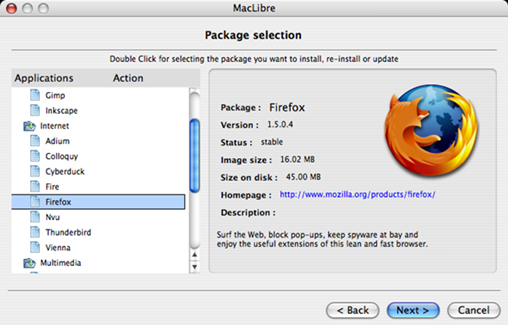
winlibre maclibre

If you are looking for best open source apps for windows check 20 Opensorce apps, 40 Free aaps

Via Lifehacker

Share this:

  • Tweet

Related

About Ram

I am a blogger and Technology Enthusiast. I write about software, tech news, gadgets. You can reach me at ram@teknobites.com, follow me on Google+ or on Twitter

« Make Comic Strips with Flickr Photos
Alt Tab – App switcher for symbian devices »

Comments

  1. Veerasundar says

    Maclibre looks almost similar to Package installer in Linux. Cool apps.

Top Posts

  • Updated YouTube iOS App Adds Support for Live Streaming
  • Browser to Browser phone calls
  • Lenovo Smart Band HW01 with OLED display launched at Rs 1999
  • Turn images to icons with Bradicon
  • 20 Open Source Windows Apps For You
  • Lively: Virtual World from Google
  • Doodle 4 Google Contest for School Children in India
  • Lenovo 5-inch tablet images leaked
  • Windows Phone 8: Everything you need to know
  • Top Quad Core Android Phones Below Rs. 15000 in India

About Us · Archive · Disclaimer & Privacy Policy · TIP US · Copyright © 2026 · Technology Bites