Technology Bites

  • Home
  • Tech
    • Software
    • Browsers
    • Google
    • Internet
    • Windows
  • Mobile
    • Android
    • Apple
    • Windows Phone
  • Products
    • Phones
    • Tablets
  • TIP US
You are here: Home / Software / How to upgrade Firmware on Samsung LED TV

How to upgrade Firmware on Samsung LED TV

Your LED TV whether it is Samsung or Sony Bravia or other brands like Toshiba all come with firmware that has to be upgraded periodically. Companied release firmware upgrades now and then, you need to check in between whether your LCD or LED TV needs a firmware upgrade.

The process of upgrading firmware is not complicated it is easy and can be completed in few steps.

Identify your TV model number, usually it is on the back of your TV on a sticker. Now go to your local vendor website, Samsung or Sony, go to Downloads section and select your TV model from the list. Alternatively you can go to the global download center to download the firmware.

Download the firmware file from the website to your computer.

Take an empty USB key and format it, now unzip the firmware file and extract the files to the USB key. Now connect the USB key to one of TV USB slots.

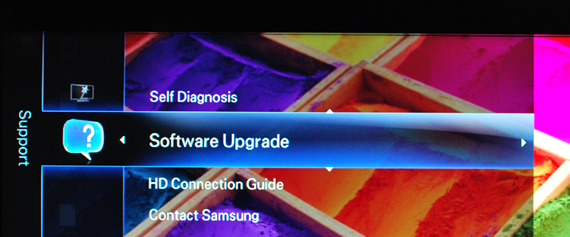
Go to Menu using remote control, select Software update, select USB and  enter.
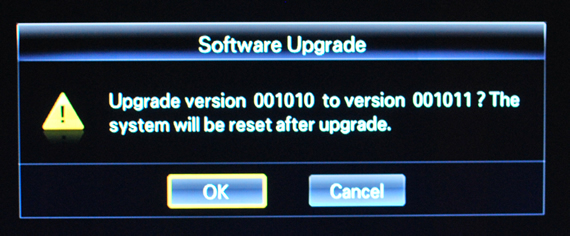
It will display the version numbers, check you are upgrading from lower version number to higher and enter. It will do the upgrade, it will take a minute or so. Once it is complete  your TV will reboot.
Now remove the USB from your TV.

Share this:

  • Tweet

Related

About Ram

I am a blogger and Technology Enthusiast. I write about software, tech news, gadgets. You can reach me at ram@teknobites.com, follow me on Google+ or on Twitter

« Screenshots reveal Metro styled Windows Live web services
Huawei launches Honor & Ideos X5 Pro in India »

Top Posts

  • HTC One X unveiled, Quad-Core Tegra 3, Android 4.0
  • Your own Twitter with Prologue and Wordpress
  • Micromax A89 Ninja Review
  • Sony announces PlayStation 4 with Social Features, Specs
  • Microsoft Releases Free Virtual Desktop Manager for Windows
  • NoLed - Use AMOLED Display instead of Led Lights for Notifications
  • SPDY: Google Looking to Speed Up the Web with New Protocol
  • Samsung's ChatON hits 100 million users and supports 63 languages
  • PPSSPP - The First PSP Emulator for Android
  • Amazon launches Prime Video service in India

About Us · Archive · Disclaimer & Privacy Policy · TIP US · Copyright © 2025 · Technology Bites


Loading Comments...