Fragmentation of files occurs when system cannot allocate contiguous space for file storage and files are stored in bits with gaps in between on the hard drive. This fragmentation makes the system sluggish, slowing the time it takes to open an application or save a file to the disk.
Windows comes with a Disk defragmentation utility that mostly does the job of disk defragmentation, but if you want more speed and advanced features there are several free third party software that are designed for defragmenting hard drives. Auslogics disk defrag is a freeware and worth checking out for disk defragmentation.
Download and install the software, make sure you are not installing any third party software along with it. Auslogics Disk Defrag also comes as a portable version, you can use that to do defragmentation with out installing the software.
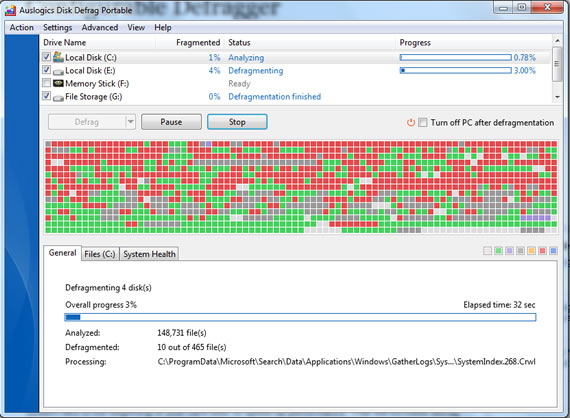
The program interface is simple and get you working through immediately. Let the program first analyze your hard disk to check the defragmentation level. After analysis it gives the report whether your disk needs defragmentation or not. Then only start the defragmentation process to save time, the program is really fast and finishes the defragmentation in minutes depending on the hard disk size.
Disk Defrag has an option that allows system files to be moved to the the fastest part of the hard disk, that improves the system performance as the time taken to access these files will be minimized.
If you need an alternative, fast defragmentation utility you can use this software for defragmenting your hard drive. The latest version 3.4.0 brings new features including improved stability, improved defragmentation speed, and all previously known bugs have been fixed in this version.
Download Auslogics Disk Defrag

