Windows crashes when it encounters a critical error, the error may be because of the hardware or driver. Computer crashes immediately to prevent damage to the hardware or data stored. Usually you will see a BSOD (Blue Screen of Death) screen when your system crashes, but this is not the case always.
BSOD gives some information like what driver is causing an error to crash the system, but if BSOD is not showing and system restarts simply you are not sure what is happening or what is causing the problem. Windows stores crash dump files in Windows directory, if you have enabled crash dump files logging, you can debug the files to know what is causing your system to crash.
WhoCrashed is a software for Windows that allows users to analyze crash dump files to see what is causing the system crash. After installing just click analyze, it will show what is causing the crash, whether a driver or a kernel module. The error report also includes helpful links to online resources like MSDN library documents for more information errors and how to prevent them happening.
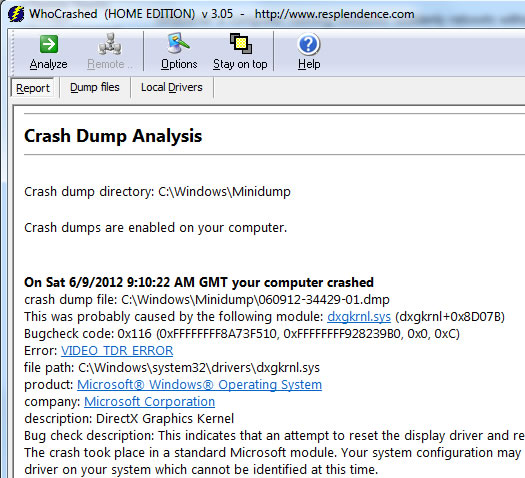
When I ran this tool, it showed me this error.
On Sat 6/9/2012 9:10:22 AM GMT your computer crashed
crash dump file: C:\Windows\Minidump\060912-34429-01.dmp
This was probably caused by the following module: dxgkrnl.sys (dxgkrnl+0x8D07B)
Bugcheck code: 0x116 (0xFFFFFFFF8A73F510, 0xFFFFFFFF928239B0, 0x0, 0xC)
Error: VIDEO_TDR_ERROR
file path: C:\Windows\system32\drivers\dxgkrnl.sys
product: Microsoft® Windows® Operating System
company: Microsoft Corporation
description: DirectX Graphics Kernel
Bug check description: This indicates that an attempt to reset the display driver and recover from a timeout failed.
The crash took place in a standard Microsoft module. Your system configuration may be incorrect. Possibly this problem is caused by another driver on your system which cannot be identified at this time.
WhoCrashed is free for home use and works with Windows 7, Vista, 2008 Server, XP and Sever 2003. For Windows XP or lower you need to download and install Windows Debugging Package (WinDbg) for this program to use.

