Technology Bites

  • Home
  • Tech
    • Software
    • Browsers
    • Google
    • Internet
    • Windows
  • Mobile
    • Android
    • Apple
    • Windows Phone
  • Products
    • Phones
    • Tablets
  • TIP US
You are here: Home / Browsers / Set Gmail as the default Email client in Chrome

Set Gmail as the default Email client in Chrome

Some of us use Gmail most of the time and don’t use desktop Email application at all, in this situation if you click on a mailto: link in web pages or in applications it will take you to the system default client like Outlook which you don’t use.

While Internet Explorer and Firefox allow you to set Gmail as your default Email client, till now Chrome didn’t allow that. You need to copy that email and open Gmail compose window and paste that email address. But now you can set Gmail as your default Email client in Google Chrome.

If you open Gmail in Chrome starting today you will be asked whether you want to Gmail to open all email links. You can say yes to set Gmail as your default email, after that whenever you click email links in any application on your system will open a Gmail compose Window.

To set Gmail as default email program in Firefox is pretty simple, go to Firefox –> Options –> Applications tab, search for mailto or use the scroll bar, and select Gmail from the drop down menu below the action bar.
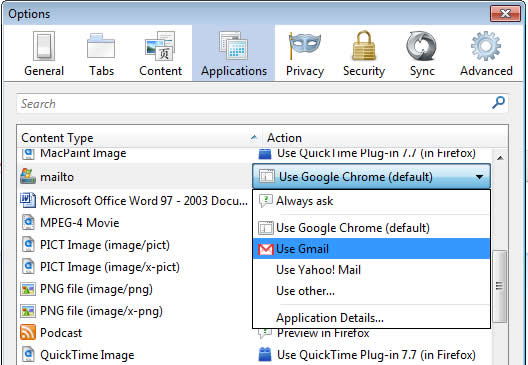
Source: Google

Share this:

  • Tweet

Related

About Ram

I am a blogger and Technology Enthusiast. I write about software, tech news, gadgets. You can reach me at ram@teknobites.com, follow me on Google+ or on Twitter

« Google Offers $1 million to find Exploits in Chrome
Android 5.0 Jelly Bean to come this fall »

Top Posts

  • Security Flaw in Google Chrome Browser
  • HTC Desire XDS dual SIM phone available online for Rs. 15999
  • Nokia 207 and 208 announced, budget feature phones with 3G
  • Samsung received 9 million pre orders for Galaxy S III
  • Download 10000 Free Shapes for Photoshop
  • Samsung Galaxy S5 may not include QHD display, eye scanner
  • Absinthe 2.0.1 for untethered jailbreak of iOS 5.1.1, supports iPhone 4S, new iPad
  • Printo offers digital printing services in India
  • HTC Desire 310 is now official in China
  • NoLed - Use AMOLED Display instead of Led Lights for Notifications

About Us · Archive · Disclaimer & Privacy Policy · TIP US · Copyright © 2025 · Technology Bites


Loading Comments...