Technology Bites

  • Home
  • Tech
    • Software
    • Browsers
    • Google
    • Internet
    • Windows
  • Mobile
    • Android
    • Apple
    • Windows Phone
  • Products
    • Phones
    • Tablets
  • TIP US
You are here: Home / Software / Organize Taskbar Items with Taskix

Organize Taskbar Items with Taskix

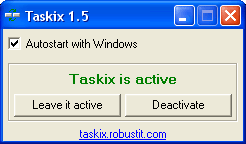
TaskixTaskix is a tiny freeware application that allows you to organize your taskbar items. The application is just 70 kb in size. It won’t do a whole lot of things, it is helpful to organize your taskbar.

There is no installation this is a standalone app, first time when you open it it will ask you to activate it, once you activate you can drag and drop taskbar items. If you wish to remove this just re open the program and select deactivate and delete the folder. It works with Windows Xp, Server 2003 and Vista. Download Taskix

Share this:

  • Tweet

Related

About Ram

I am a blogger and Technology Enthusiast. I write about software, tech news, gadgets. You can reach me at ram@teknobites.com, follow me on Google+ or on Twitter

« Upload files to multiple file sharing sites
Google Sites now open to everyone »

Comments

  1. Nirmal says

    I’ll try it on Vista today. 🙂

Top Posts

  • DSP Manager: The Best Equalizer app for Android
  • How to Flash Ubuntu Touch Developer Preview on Galaxy Nexus, Nexus 4, 7, 10
  • Circle Dock: Application Launcher
  • HTC Launches One X and One V Smartphones in India
  • How to Sync MS Office documents with Google Docs
  • Gmail Search now brings up information about your contacts, Google+ integration
  • Add simple reminders to notifications bar with Notable for Android
  • Nokia Debuts Smart Camera App with Lumia 925
  • Download 10000 Free Shapes for Photoshop
  • Web 2.0 Background Generators

About Us · Archive · Disclaimer & Privacy Policy · TIP US · Copyright © 2026 · Technology Bites