Today strangely i saw an error in my wp-admin dashboard, the error is this
Warning: Unknown: Failed to write session data (files). Please verify that the current setting of session.save_path is correct (/tmp) in Unknown on line 0
I quickly did a search on wordpress forums and on Google but couldn’t find an answer for this. After a close look at the error i figured out it is because tmp folder is not there on my account. Previously this blog is on my own server and i didn’t have this problem, but last week i moved this one to dreamhost temporarily because of heavy load on my server. Dreamhost accounts don’t come with tmp folder that is why this problem.
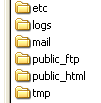 Quick fix for this is to create a tmp folder in your account, if you are on a linux host create tmp folder in the same directory where your public_html resides (not under your site root, see the image). Set the permissions to this folder as 700 (“chmod 700“). If you are using dreamhost create a tmp folder on your account root that is outside your site root folder.
This worked for me, if you know any other reason for this comment here.


I saw this same problem shortly after making three changes–I installed Smedberg’s Atom 1.0 plugin; I’d been playing with directory permissions on my host (Hosting Matters, if it matters); and I’d installed the Java plug-in.
The key turned out to be disabling Java and restarting the browser. Oddly, just to test, I re-enabled Java, and the problem has not yet recurred.
I’m running Java plug-in 1.6._06-b02 in Firefox 3 beta 5 on Ubuntu 8.04.
Cross-posted on my blog here.