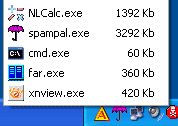
 Task killer allows you to kill running processes from your taksbar. It sits in the taskbar as a small icon, clicking that will show the current running processes and their memory usage. You can kill any running process by clicking the name of the application.
It is a good alternative to Windows Task Manager, you can kill running processes with out opening task manager.
Task Killer is a freeware application and only for Windows.
via Lifehacker


I installed this a couple of days ago – it’s really handy. Saves loads of hassle when things like firefox crash!
Nice tool there. I think I’ll be installing it right away, because my computer is running slow and hangs ofen 😀
It will be good to have this for a change.