Technology Bites

  • Home
  • Tech
    • Software
    • Browsers
    • Google
    • Internet
    • Windows
  • Mobile
    • Android
    • Apple
    • Windows Phone
  • Products
    • Phones
    • Tablets
  • TIP US
You are here: Home / Software / Schedule backups or sync files with Backup SafeKeeper

Schedule backups or sync files with Backup SafeKeeper

Backup Safekeeper is a freeware which allows you to backup your files or sync files with other devices. Once you setup a backup/sync profile you can schedule the backup process so you won’t need to remember again to bakup the data.

Features:

  • Backup files at any time with a single click
  • Schedule your backups to run without user interaction.
  • Recover lost files with simple recovery process.
  • Incremental backups are supported.
  • Smart Sync will allow you to have the same file in all your devices.
  • Keep your backups completely secure with 256-bit AES encryption.
  • Compress your backups using the latest compression technology. You can compress an unlimited size, and an unlimited number of files.
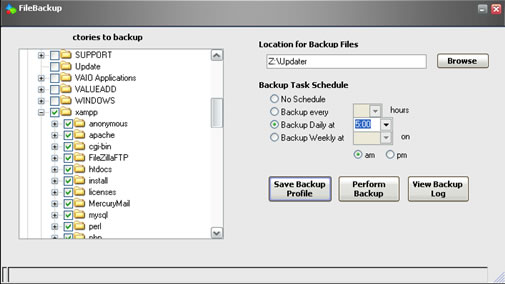
backup safekeeper

Share this:

  • Tweet

Related

About Ram

I am a blogger and Technology Enthusiast. I write about software, tech news, gadgets. You can reach me at ram@teknobites.com, follow me on Google+ or on Twitter

« Email checker and notifier for GNOME desktop
Movable Type finally goes Open Source »

Comments

  1. Haris says

    I’m always in search of backup tools. Thanks for sharing this one! šŸ™‚

Top Posts

  • Fake Windows 8 - A Must Have Android App for Windows 8 Lovers
  • Best Firefox 3 Extensions Winners
  • 10 Dollar Laptop
  • Samsung Galaxy Grand 2 with 5.25-inch Display launched in India, available from January 2014
  • Sony Officially launches Xperia Tipo and Tipo Dual in India for Rs. 9999 and Rs. 10499
  • Yahoo acquires visualization startup Vizify
  • Asus FonePad 7 launched in India at ?17499
  • Contact
  • Dell launches Android tablets Venue 7 and Venue 8
  • Video Chat in iGoogle

About Us · Archive · Disclaimer & Privacy Policy · TIP US · Copyright © 2026 · Technology Bites