PDFHammer is an online tool that lets you edit PDF documents online. You can upload a pdf file and rearrange the pages of the file or delete some pages and export as a new pdf document.
You can also upload multiple pdf files and edit them by deleting pages or rearranging pages from both files in to one and publish as a new file. This is a good way if you want to merge pdf documents.
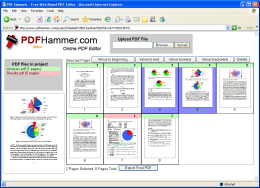
PDFHammer is free to use, and will have some more features like rotating the pages, adding watermarks and stamps to pages in the near future.


Looks like a useful app. Nice find buddy
Nice tool and much needed one, but can I add content to it?
@Nirmal
I don’t think you can add content to it, you can add content from PDF docs though
@Brown
Glad you liked it
good find Ram…
Does anyone know of a tool which would let me upload a word/excel document online and let me add and save changes, all online?!
Hi,
Thanks for the recent mention of PDF Hammer. I just wanted to let you know that we’ve released an update to the free PDF editor. Users can now secure PDF files and add metadata to them (as well as edit and merge pages).
I’d love to hear what you think about the latest version.
http://www.pdfhammer.com
BTW, there’s also now zoom functionality. Just double click on any page and you’ll get a larger view.
Thanks for sharing! Very useful article. I wanna add one thing. I use http://www.PDFfiller.com as a pdf tool. It`s very unexpensive. I like it.