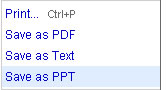
 Google Docs now allows you to save Google presentations as .ppt files so that you can edit them offline in Microsoft Powerpoint. This is a missing feature from long and now Google added it. Earlier it is only possible to import .ppt files to Google presentations but no official way to save them as .ppt.
You will find the link “save as PPT” in the file menu of the Google Presentation you are editing. Click on it and save the document as .ppt. You can also save your Google Presentations as PDF or Text files. Source: Google Docs Blog


Much needed feature from Google.