Technology Bites

  • Home
  • Tech
    • Software
    • Browsers
    • Google
    • Internet
    • Windows
  • Mobile
    • Android
    • Apple
    • Windows Phone
  • Products
    • Phones
    • Tablets
  • TIP US
You are here: Home / Software / Batch Download Flickr Photos with Flump

Batch Download Flickr Photos with Flump

Flump is a Adobe AIR application that lets you download Flickr photos of any Flickr user to your hard drive.

Using this app is straightforward, enter the flickr username or ID and specify the location in your hard drive to store photos and start flump. If you don’t know your Flickr ID you can get it here.
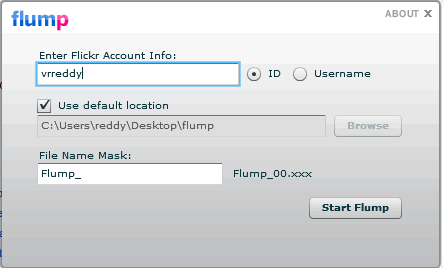
Flump Adobe Air App

Currently it can only download the original image source, that means for it to download images Flickr account owner has to set their account permissions to allow the original images to be downloaded.

Flump is simple to use than many other tools, its perfect to take a backup of your Flickr photos.

Share this:

  • Tweet

Related

About Ram

I am a blogger and Technology Enthusiast. I write about software, tech news, gadgets. You can reach me at ram@teknobites.com, follow me on Google+ or on Twitter

« IZArc: Free Archiving Tool
OperaTor: Portable Browser for Anonymous Browsing »

Top Posts

  • Google Chrome for iPhone and iPad
  • Sony Walkman Player for Android Ice Cream Sandwich and Jelly Bean
  • Four Eyed Monsters: First Full Length Film on Youtube
  • iWidgets: Social Widgets for your sites or brands
  • Sony Xperia E1 and E1 dual launched in India for Rs 9490 and Rs 10490
  • TypeSmart: The Perfect Alternative Keyboard for Android
  • Compare: Karbonn Smart A111 vs Micromax Canvas II A110
  • Spock: New People Search Engine
  • Free 1 Year License Key for Spyware Doctor with AntiVirus 6 and Privacy Guardian
  • Device Manager for Windows

About Us · Archive · Disclaimer & Privacy Policy · TIP US · Copyright © 2026 · Technology Bites