 Google Gmail team added voice and video chat to Gmail. The feature has been rolled out today, it requires you to download a plugin and install it. The plugin works both PCs and Macs.
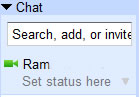
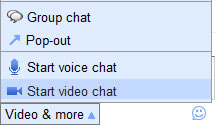
After installing the plugin restart the browser, now you will see a camera icon next to your name. Your friends names who have installed this plugin also show the camera icon in the chat list. Click the contact name to start the chat, here you will see Video & more on the bottom of the chat window, clicking that will show you you start video chat and start voice chat links. Clicking on the start video chat will open up the video provided you have the webcam in your system.
Gmail Blog notes
Once you install the plugin, to start a video chat, just click on the “Video & more” menu at the bottom of your Gmail chat window, and choose “Start video chat.” You’ll have a few seconds to make sure you look presentable while it’s ringing, and then you’ll see and hear your friend live, right from within Gmail. You can click the “pop-out” iconto make the video larger, or click the fullscreen iconin the upper left-hand corner for a fully immersive experience. See this all in action in the video below:


[…] offered video chat feature in Gmail for quite sometime. Now Google added the same feature to iGoogle, from now you can access the video […]