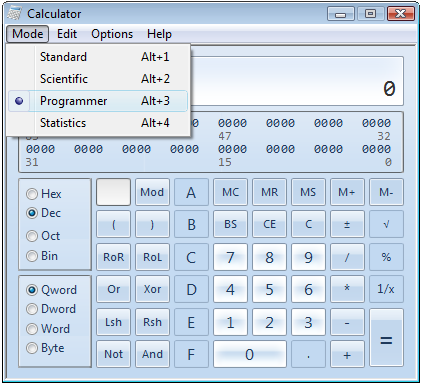
Windows 7 got a useful Calculator with lot of options. Windows Vista calculator has two modes, one is standard and the other is Scientific, Windows 7 calculator got Programmer and Statistics modes apart from Standard and Scientific modes. Not only modes but it has some options which allow you to calculate from Gas mileage to mortgage calculation.
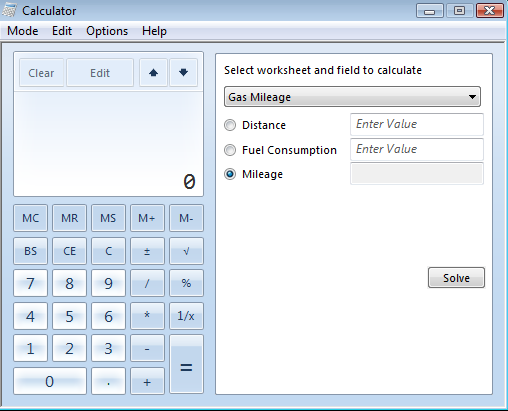
After opening the new calendar you can switch calculator modes using the “Mode” menu. If you go to “Options” menu you will see Date Calculation, Templates, Unit Conversion links. Clicking on templates will open an inline window where you can calculate Gas Mileage, Lease Estimation, Mortgage Estimation and Wage Estimation.
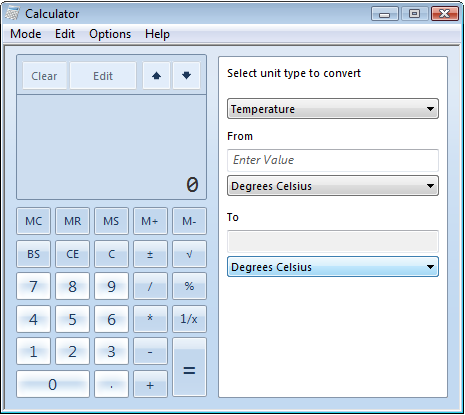
Unit conversion option allows to convert common unit types like volume, energy, mass etc from one unit value to another. This unit converter is useful for students to quickly convert units from one to other.
Download the Zip file from here. Extract the zip file and open the calc.exe file to use it right away. If you want to replace your existing calculator with this windows 7 calculator then first backup this file C:\Windows\System32\calc.exe and replace it with the file from the archive. Then backup this file C:Windows\System32\en-US\calc.exe.mui and replace it with the one in the archive.
Source Daily Gyan, Via Lifehacker


Thanks for this.
The W7 calc is great.