Technology Bites

  • Home
  • Tech
    • Software
    • Browsers
    • Google
    • Internet
    • Windows
  • Mobile
    • Android
    • Apple
    • Windows Phone
  • Products
    • Phones
    • Tablets
  • TIP US
You are here: Home / Software / How to uninstall Office 2013 Preview

How to uninstall Office 2013 Preview

Microsoft Office 2013 preview released this week, and several enthusiasts downloaded the software to see what this upcoming version of Office has to offer compared to previous versions. After playing with it for some time if you want to uninstall Office 2013, it is a bit different from the traditional uninstall process we are accustomed to.

To uninstall Office 2013 from your system follow these steps.

Office 365 Home Premium: Go to Office.com/myaccount and then at the Current PC Installs click the “Deactivate” link, this will allow you to install Office 2013 on other systems. One product key is good enough for 5 systems.
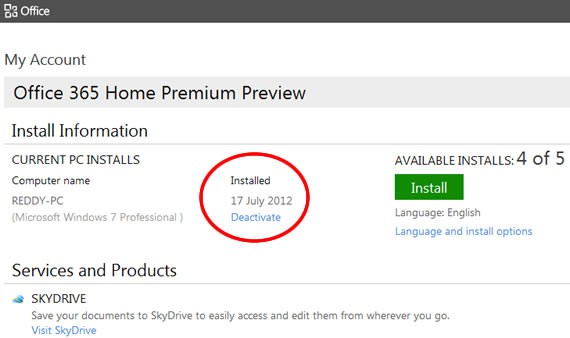
Deactivating Office will make the programs read only, that means you can view documents, but you can’t edit or create documents.

To Remove completely from your system, after deactivating online, go to control panel and uninstall Microsoft Office 365 Home Premium Preview.
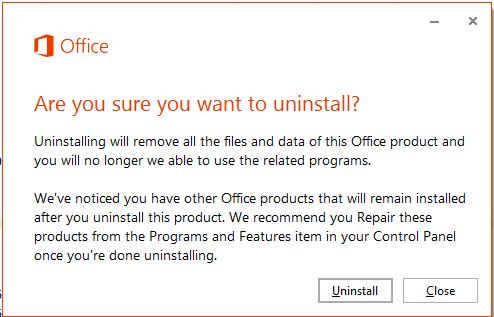
Other Office 365 plans: Log in to Office365.com to deactivate Office installations from your PC.

Share this:

  • Tweet

Related

About Ram

I am a blogger and Technology Enthusiast. I write about software, tech news, gadgets. You can reach me at ram@teknobites.com, follow me on Google+ or on Twitter

« Download Microsoft Office 2013 Offline Installer
Reliance Communications launches 3G tablet at Rs. 14,499 »

Top Posts

  • Fake Windows 8 - A Must Have Android App for Windows 8 Lovers
  • Wikia Search Launches
  • Turn Your Blog into an iPhone App with AppLoop
  • Google to launch Chrome Operating System
  • Compare: Karbonn Titanium Octane Plus vs Micromax Canvas Knight vs Gionee Elife E7 mini
  • Internet Explorer 10 preview
  • Blackberry Curve 9320 available in India for Rs 15499
  • Microsoft launches Skype Lite for India, optimized for slow connections
  • Blogged: Human Edited Blog Directory
  • LG Gx launched in Korea with 5.5-inch screen, Snapdragon 600

About Us · Archive · Disclaimer & Privacy Policy · TIP US · Copyright © 2026 · Technology Bites


Loading Comments...