Technology Bites

  • Home
  • Tech
    • Software
    • Browsers
    • Google
    • Internet
    • Windows
  • Mobile
    • Android
    • Apple
    • Windows Phone
  • Products
    • Phones
    • Tablets
  • TIP US
You are here: Home / Internet / AVG LinkScanner for real-time web page scanning

AVG LinkScanner for real-time web page scanning

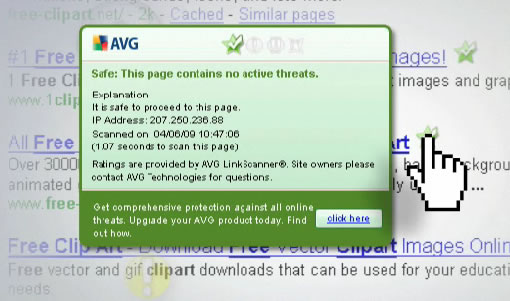
AVG is offering its LinkScanner feature as a stand-alone plugin for both Firefox and IE. AVG Anti-virus edition already has this feature, with the new browser plugin users who don’t use AVG can also use this LinkScanning feature.
avg-linkscanner

LinkScanner basically scans web pages users about to click or links they in browser. It also scans search results from Google, Yahoo and MSN search and advises users if there are any malicious pages in the results. The links from search results show icons with green, yellow and red colors. Green icon means safe webpage, yellow means caution and red means unsafe web page. This is not new, McAfee is offering this feature as McAfee Siteadvisor from quite some time. Google also offers warnings in search results to protect users from malicious sites.

Download AVG LinkScanner [Via Download Squad]

Share this:

  • Tweet

Related

About Ram

I am a blogger and Technology Enthusiast. I write about software, tech news, gadgets. You can reach me at ram@teknobites.com, follow me on Google+ or on Twitter

« Google News Timeline
Polaris: Google Analytics Dektop App »

Top Posts

  • Google Chrome for iPhone and iPad
  • Sony Walkman Player for Android Ice Cream Sandwich and Jelly Bean
  • Get Kaspersky Internet Security 2009 Trial Key For Six Months
  • Breaking: Google Announces Search Deal with Twitter
  • Convert PDF to Word or Images with First PDF
  • New Gmail v4.5 for Android starts rolling out
  • Download 10000 Free Shapes for Photoshop
  • Download Firefox 3 now
  • Internet Explorer 8 is Available from Today
  • Download Facebook Messenger for Windows Phone

About Us · Archive · Disclaimer & Privacy Policy · TIP US · Copyright © 2026 · Technology Bites


Loading Comments...