Technology Bites

  • Home
  • Tech
    • Software
    • Browsers
    • Google
    • Internet
    • Windows
  • Mobile
    • Android
    • Apple
    • Windows Phone
  • Products
    • Phones
    • Tablets
  • TIP US
You are here: Home / Browsers / Install Wordpress Plugins and Themes in OneClick

Install WordPress Plugins and Themes in OneClick

Tired of installing plugins and themes by opening FTP and uploading or you are unable to use FTP in office, then this extension is for you. OneClick Installer for WordPress Firefox Extension makes it easy for you to upload plugins and themes in a single click without opening FTP program.

Anirudh made this extension, he made it as an extension to his plugin OneClick Install. This plugin and Firefox extension installed you just right click on the plugin from the download page, a context menu will open with oneclick install option, click that and you are done. Now activate your plugin or theme from your dashboard.
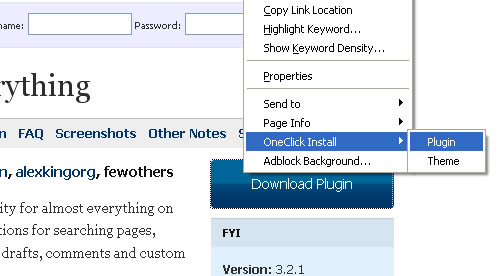
oneclick firefox extension

[via]

Share this:

  • Tweet

Related

About Ram

I am a blogger and Technology Enthusiast. I write about software, tech news, gadgets. You can reach me at ram@teknobites.com, follow me on Google+ or on Twitter

« 10 Clean and Light WordPress Themes
How to Run WordPress as CMS »

Comments

  1. Haris says

    I have just started using this plugin, and have found it very useful. Thanks for sharing!

  2. Benedict Herold says

    That is really nice plugin.. I can save lot of time!

Top Posts

  • Download 10000 Free Shapes for Photoshop
  • Download Windows Embedded theme for Windows XP and 2003
  • Nested Twitter Replies Greasemonkey Script
  • How to root Verizon Galaxy S4 SCH-i545
  • Twhirl: Twitter client
  • Google Toolbar for Firefox Adds Chrome's New Tab Feature
  • Google Music Manager now allows music downloads
  • Download Windows 8 Release Preview
  • ZTE Open is the first Firefox OS Phone available in India, Priced at ?6990
  • Wordpress session save path error

About Us · Archive · Disclaimer & Privacy Policy · TIP US · Copyright © 2026 · Technology Bites