Technology Bites

  • Home
  • Tech
    • Software
    • Browsers
    • Google
    • Internet
    • Windows
  • Mobile
    • Android
    • Apple
    • Windows Phone
  • Products
    • Phones
    • Tablets
  • TIP US
You are here: Home / Tech News / Save Google Presentations as PPT for Microsoft Powerpoint

Save Google Presentations as PPT for Microsoft Powerpoint

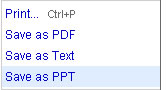
Google PresentationsGoogle Docs now allows you to save Google presentations as .ppt files so that you can edit them offline in Microsoft Powerpoint. This is a missing feature from long and now Google added it. Earlier it is only possible to import .ppt files to Google presentations but no official way to save them as .ppt.

You will find the link “save as PPT” in the file menu of the Google Presentation you are editing. Click on it and save the document as .ppt. You can also save your Google Presentations as PDF or Text files. Source: Google Docs Blog

Share this:

  • Tweet

Related

About Ram

I am a blogger and Technology Enthusiast. I write about software, tech news, gadgets. You can reach me at ram@teknobites.com, follow me on Google+ or on Twitter

« Flickr Video Launched
Adobe Media Player »

Comments

  1. Nirmal says

    Much needed feature from Google.

Top Posts

  • Download 10000 Free Shapes for Photoshop
  • Download Windows Embedded theme for Windows XP and 2003
  • Nested Twitter Replies Greasemonkey Script
  • How to root Verizon Galaxy S4 SCH-i545
  • Twhirl: Twitter client
  • Google Toolbar for Firefox Adds Chrome's New Tab Feature
  • Google Music Manager now allows music downloads
  • Download Windows 8 Release Preview
  • ZTE Open is the first Firefox OS Phone available in India, Priced at ?6990
  • Wordpress session save path error

About Us · Archive · Disclaimer & Privacy Policy · TIP US · Copyright © 2026 · Technology Bites