Technology Bites

  • Home
  • Tech
    • Software
    • Browsers
    • Google
    • Internet
    • Windows
  • Mobile
    • Android
    • Apple
    • Windows Phone
  • Products
    • Phones
    • Tablets
  • TIP US
You are here: Home / Browsers / Digg Firefox 3 Extension with Live Notifications

Digg Firefox 3 Extension with Live Notifications

Digg released an official Firefox 3 extension that adds a digg toolbar to the Firefox browser, the tool will let you know if the page you are visiting is already submitted to digg, if it is submitted it will show digg count and the comment count. If the page is not submitted you will see a submit button for you to submit the story.

Digg Toolbar

Download the extension from here, and install it, first time it will ask you to enter your digg username and digg topics of interest to you.

The toolbar also alerts you to when new stories become popular on digg by showing the story details as notifications in the bottom of the browser. Using the toolbar you can also follows your friends diggs.
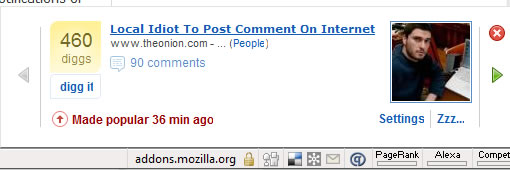
Digg Firefox Notifications

Download Digg Extension for Firefox 3, if you are still using Firefox 2 you can get digg extension here.

Share this:

  • Tweet

Related

About Ram

I am a blogger and Technology Enthusiast. I write about software, tech news, gadgets. You can reach me at ram@teknobites.com, follow me on Google+ or on Twitter

« Send Orkut Scraps Via SMS from Your Mobile Phone
Mloovi Translates RSS Feeds to 24 Languages »

Top Posts

  • Updated YouTube iOS App Adds Support for Live Streaming
  • Browser to Browser phone calls
  • Lenovo Smart Band HW01 with OLED display launched at Rs 1999
  • Turn images to icons with Bradicon
  • Windows Phone 8: Everything you need to know
  • Top Quad Core Android Phones Below Rs. 15000 in India
  • Nokia Asha 502 and Asha 503 start selling today in select markets
  • 20 Open Source Windows Apps For You
  • Lively: Virtual World from Google
  • Doodle 4 Google Contest for School Children in India

About Us · Archive · Disclaimer & Privacy Policy · TIP US · Copyright © 2026 · Technology Bites