Technology Bites

  • Home
  • Tech
    • Software
    • Browsers
    • Google
    • Internet
    • Windows
  • Mobile
    • Android
    • Apple
    • Windows Phone
  • Products
    • Phones
    • Tablets
  • TIP US
You are here: Home / Software / Get detailed information about any Windows file with FileAlyzer

Get detailed information about any Windows file with FileAlyzer

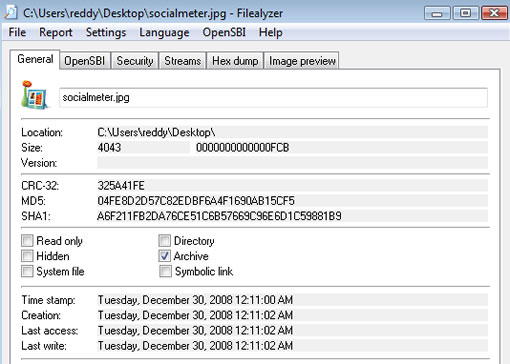
The default Windows file properties shows only limited information about any file on your PC. FlieAlyzer is a windows freeware that gives detailed information about any file on your PC, it provides more information than the properties window.

Once FileAlyzer is installed, it adds a link to your context menu, so you can right click on any files and click analyze to see properties. The information includes metadata for audio tags for MP3s, preview for archived files etc. It also displays MD5, SHA-1 and CRC-32 hashes so you can verify downloaded files if they are corrupted or changed while downloading. FileAlyzer displays time stamp for created date, last accessed date, and last written date, this is useful if you have multiple copies of the same file in other folders and want to know which one is the latest edit.
Share this:

  • Tweet

Related

About Ram

I am a blogger and Technology Enthusiast. I write about software, tech news, gadgets. You can reach me at ram@teknobites.com, follow me on Google+ or on Twitter

« Happy New Year! Wish You A Great 2009
Activation Key for Parallels Workstation for Windows & Linux »

Top Posts

  • Updated YouTube iOS App Adds Support for Live Streaming
  • Browser to Browser phone calls
  • Turn images to icons with Bradicon
  • Lenovo Smart Band HW01 with OLED display launched at Rs 1999
  • Best of Technology Bites 2007
  • Software Key Revealer and Game Key Revealer
  • WeatherLove - A New Weather Widget and App for Android
  • Windows 8 Blue to Bring Back Start Button and Boot to Desktop
  • Photo Soup word puzzle based on Flickr tags - Time Waster
  • iGoogle Updates: Google Reader, Gmail integration and more

About Us · Archive · Disclaimer & Privacy Policy · TIP US · Copyright © 2026 · Technology Bites


Loading Comments...