Technology Bites

  • Home
  • Tech
    • Software
    • Browsers
    • Google
    • Internet
    • Windows
  • Mobile
    • Android
    • Apple
    • Windows Phone
  • Products
    • Phones
    • Tablets
  • TIP US
You are here: Home / Google / Gmail Goggles: Stop drunk emailing

Gmail Goggles: Stop drunk emailing

Gmail Labs has introduced a new feature today that helps you to not to send emails when you are drunk or tired. The feature is called Goggles which is active on weekend late nights by default.
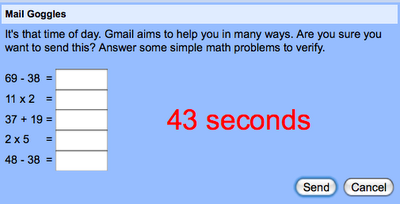
Gmail Goggles

Gmail Goggles can activated from Gmail -> Settings -> Labs. Once activated it shows a random math questions when you try to send a mail in weekend late nights. You can change the time and day for the Goggles activation from Settings -> General Tab.

I may not use it much myself but it is definitely useful for people and is fun.

Gmail Goggles

Share this:

  • Tweet

Related

About Ram

I am a blogger and Technology Enthusiast. I write about software, tech news, gadgets. You can reach me at ram@teknobites.com, follow me on Google+ or on Twitter

« Spellist: Check spelling mistakes on your site
Geode: Your browser knows where you are »

Comments

  1. Артём Курапов says

    I’m sure that everyone is able to solve it using Start-> run -> “calc”

Top Posts

  • HTC One X unveiled, Quad-Core Tegra 3, Android 4.0
  • Your own Twitter with Prologue and Wordpress
  • Micromax A89 Ninja Review
  • Sony announces PlayStation 4 with Social Features, Specs
  • Microsoft Releases Free Virtual Desktop Manager for Windows
  • NoLed - Use AMOLED Display instead of Led Lights for Notifications
  • SPDY: Google Looking to Speed Up the Web with New Protocol
  • Samsung's ChatON hits 100 million users and supports 63 languages
  • PPSSPP - The First PSP Emulator for Android
  • Amazon launches Prime Video service in India

About Us · Archive · Disclaimer & Privacy Policy · TIP US · Copyright © 2025 · Technology Bites