Technology Bites

  • Home
  • Tech
    • Software
    • Browsers
    • Google
    • Internet
    • Windows
  • Mobile
    • Android
    • Apple
    • Windows Phone
  • Products
    • Phones
    • Tablets
  • TIP US
You are here: Home / Google / Upload and Share PDF Files with Google Docs

Upload and Share PDF Files with Google Docs

Now you can upload, preview and share PDF files using Google Docs. Editing of the PDF files is not yet there, but you can copy & paste text from them.

This is the most requested feature for Google Docs, PDF support will be liked by most of the Google Docs users as this is the popular format for sharing documents with others.

To upload a pdf click on upload and select PDF file from your computer or provide a web url to upload. Maximum file size you can upload is 10MB from your computer and 2MB from web.
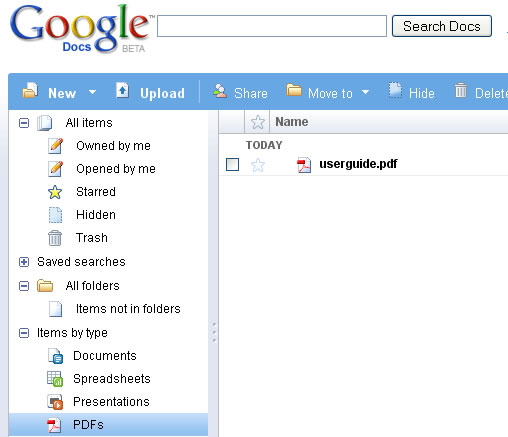
Google Docs PDF Support

Share this:

  • Tweet

Related

About Ram

I am a blogger and Technology Enthusiast. I write about software, tech news, gadgets. You can reach me at ram@teknobites.com, follow me on Google+ or on Twitter

« SugarSync: File Syncing Across Multiple Devices (3 Accounts Giveaway)
Firebug for Firefox 3 »

Top Posts

  • Download 10000 Free Shapes for Photoshop
  • Sony sends invites for IFA 2013 press event, Honami unveiling expected
  • Vote for Mashable's 2nd Annual Open Web Awards
  • Yahoo testing a new tile based design similar to Windows 8
  • Micromax A111 Canvas Doodle Available Online for Rs. 12999
  • Moto X customizations revealed, color cases leak
  • Your own Twitter with Prologue and Wordpress
  • Microsoft Photosynth Goes Public
  • Avoid clicking next page links in long articles with PageZipper
  • Installing Apache webserver on Ubuntu VPS

About Us · Archive · Disclaimer & Privacy Policy · TIP US · Copyright © 2026 · Technology Bites