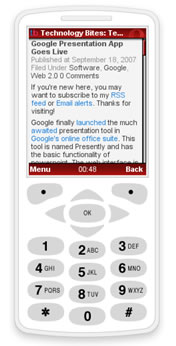
 The use of mobile devices for browsing is increasing and its now time to make your wordpress blog mobile friendly. Particularly for geek blogs it is essential to optimize their blogs for mobile devices. In this post we will see the plugins available to make your wordpress blog Mobile friendly.
Plugins:
WordPress PDA plugin enables the wordpress blog viewable for PDA browsers. It is really simple plugin which detects the browser agent and loads a simple theme on fly. The plugin comes with a theme folder which acts like normal theme with all the functionality of wordpress theme.
WordPress Mobile Edition:
A PDA friendly interface for your blog. It’s (almost) XHTML compliant. You can see it in action by visiting this site in a mobile browser.
Using this plugin you can mes all your posts, pages, archives and comments viewable on a mobile device.The plugin supports standards, comments can be submitted via mobile phone. You can also monetize your site using Admob service with this plugin.
After activating any of these plugins you check your site in a mobile device to check if everything is going well. If you don’t have a mobile device you can use Operamini demo here and the latest beta simulator here.
Update:
RSS Feeds for Mobiles:
Optimize your RSS feeds for mobiles using the following services.
Feedm8: Using this service mobile users can view your feed on their mobile phones. This service has a publisher program through which you can earn money from your RSS feeds.
Mobispine: Mobilespine is a free mobile medi browser, mobile users can search feeds and articles using this service. Add your feed to this service to reach their mobile user base.


Yeah, this is something I’ve taken notice of. I think I should look into making my blog more mobile friendly 🙂 Thanks for the heads up, Ram.
Nowadays importance of making blog mobile friendly is increasing and these are nice plugins to do the job. There is also feeds for mobile, you can include that also.
@Nirmal
Thanx for the suggestion i will update the post.
Nice post ram . I will try these plugins .
MObile support is a great stuff. this is some serious stuff. definately will try it.
Great post, ram. I’ll definitely give a try to theme plugins.
Nice articles, helped me a lot thanks.
@Deva
Glad that it is useful for you
hey buddy nice plugins… well but can you please.. gimme a plugin which you are using.. user pics… for comments
Thanks for the tips! I’m fiddling around with mobile plugins now!
The software might be just another clone of any other software. Considering all the similar evaluations of the package I’m strarting to wonder if any of the reviewers even used the software.